@context-sync/server
Universal Context layer McP server
pinned to #235fd51updated 3 months ago
Ask your AI client: “install mcps/context-sync-server”.
Requires the metahub MCP server installed in your client. Set up MCP.
mh install mcps/context-sync-servermetahub onboarded this repo on the author's behalf.
If you own github.com/Intina47/context-sync on GitHub, claim the listing to take over publishing. Your claim preserves the existing eval history and badges; only the curator label is replaced with verified-publisher on your next publish.
Stars
179
Last commit
3 months ago
Latest release
published
- #ai
- #ai-assistant
- #ai-memory
- #claude
- #clawdbot
- #code-search
- #context layer
- #context management
- #context sync
- #context-management
- #context-sync
- #continue
- #continue.dev
- #copilot
- #cursor
- #developer-tools
- #documentation
- #file-access
- #file-operations
- #git-integration
- #github-copilot
- #mcp
- #mcp-server
- #memory
- #model-context-protocol
- #moltbot
- #notion
- #notion integration
- #notion mcp server
- #openclaw
- #productivity
- #sqlite
- #tabnine
- #typescript
- #windsurf
- #workspace
- #zed
What this server exposes
Surfaces parsed from this server's source at publish time.
Launches: context-sync, context-sync-setup
Automated checks the publisher passed at publish time — structure, docs, safety, and whether the artifact behaves as claimed.235fd51· 3 months ago
Behavioral checks haven't run yet: the sandbox couldn't execute this artifact (it may need credentials we don't provide, or an unsupported build). An environment limit, not a verdict.
Documentation
4 passed1 warningDescription qualitywarn
Only 5 words · 34 chars — more detail helps discovery
Tell consumers what this artifact does in a full sentence.
README is present and substantial
3,377 chars · 9 sections · 4 code blocks
Tags / topics declared
37 total — context sync, context management, mcp, mcp-server, model-context-protocol, ai (+31)
README has usage / example sections
no labeled section but 4 code blocks document usage
Homepage / docs URL declared
https://github.com/Intina47/context-sync#readme
Release history
1- releasecurrent235fd51warn3 months ago
Contents
Local-first project memory for AI coding tools over MCP.
Context Sync gives an agent a persistent memory layer for a codebase:
- project identity and tech stack
- active work, decisions, constraints, and caveats
- structured file exploration
- git-aware context
- optional read-only Notion lookup
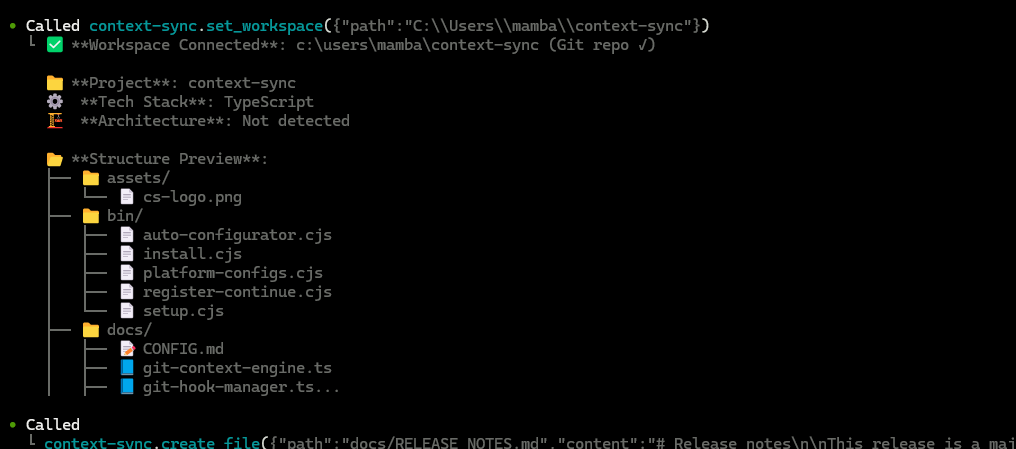
What It Does
Context Sync is built for session continuity. Instead of relying on a model to remember earlier conversations, it stores the project context that matters and makes it retrievable through a small MCP tool surface.
The current core tools are:
set_projectrememberrecallread_filesearchstructuregitnotion
Install
Install globally:
npm install -g @context-sync/server
Auto-configuration runs during global install. After install, restart your AI tool.
If you install locally instead of globally, auto-config does not run. Use the manual config guide in docs/CONFIG.md.
Verify
Check that context-sync appears in your MCP tool list:
- Claude Desktop: open the tools list
- Cursor: open the tools list
- VS Code / Copilot Chat Agent mode: check tools
- Continue.dev: open the Continue panel
- Codex CLI:
codex mcp list - Claude Code:
claude mcp list
If auto-config fails, use docs/TROUBLESHOOTING.md and docs/CONFIG.md.
Optional Notion Setup
Run the setup wizard if you want Notion integration:
context-sync-setup
or:
npx context-sync-setup
Notion support is intentionally read-only at the tool surface:
notion({ action: "search", query: "..." })notion({ action: "read", pageId: "..." })
First-Time Workflow
Start every new session by setting the project first:
1. set_project({ path: "/absolute/path/to/project" })
2. recall()
3. structure({ depth: 2 })
4. read_file({ path: "src/index.ts" })
5. remember({ type: "decision", content: "Use SQLite for local storage" })
Recommended pattern:
set_projectonce per project/session startrecallto recover contextstructureandsearchto exploreread_filefor focused inspectionrememberwhen something should survive the current session
Git Integration
When you run set_project inside a git repository, Context Sync can install hooks for automatic context capture.
Installed hooks:
post-commitpre-pushpost-mergepost-checkout
Hooks are marked with Context Sync Auto-Hook, and existing hooks are backed up first.
The git tool supports:
statuscontexthotspotscouplingblameanalysis
Data And Config
Default locations:
- Database:
~/.context-sync/data.db - Config:
~/.context-sync/config.json - Install status:
~/.context-sync/install-status.json
Custom database options:
- CLI:
context-sync --db-path /absolute/path/to/db - Env var:
CONTEXT_SYNC_DB_PATH
See docs/DATA.md for storage details.
Supported Platforms
- Claude Desktop
- Cursor
- VS Code + GitHub Copilot
- Continue.dev
- Zed
- Windsurf
- Codeium
- TabNine
- Codex CLI
- Claude Code
- Antigravity
Docs
Reviews
No reviews yet. Be the first.
Related
Next Ai Draw Io
MCP server for Next AI Draw.io - AI-powered diagram generation with real-time browser preview
Hermes Agent
The self-improving AI agent — creates skills from experience, improves them during use, and runs anywhere
Caveman
MCP proxy that compresses prose fields (tool descriptions, etc.) using caveman rules. Same accuracy, fewer context tokens.
mh install mcps/context-sync-server