toonify-mcp
Local context compression for Claude Code workflows, including structured data, debug-heavy output, and supported source files.
pinned to #88dd7fbupdated 2 months ago
Ask your AI client: “install plugins/toonify-mcp”.
Requires the metahub MCP server installed in your client. Set up MCP.
mh install plugins/toonify-mcpmetahub onboarded this repo on the author's behalf.
If you own github.com/PCIRCLE-AI/toonify-mcp on GitHub, claim the listing to take over publishing. Your claim preserves the existing eval history and badges; only the curator label is replaced with verified-publisher on your next publish.
Stars
63
Last commit
2 months ago
Latest release
published
- #claude-code
- #claude-code-plugin
- #context-compression
- #context-window
- #developer-tooling
- #mcp-server
- #model-context-protocol
- #source-code-compression
- #token-optimization
- #toon-format
Automated checks the publisher passed at publish time — structure, docs, safety, and whether the artifact behaves as claimed.88dd7fb· 2 months ago
Behavioral checks ran but aren't published for this artifact; the static checks above ran at publish time.
Kind-specific
3 passed1 warningPlugin: bundled artifacts presentwarn
Couldn't find a skills/ subdir or an MCP server config inside the plugin
A plugin is most useful when it bundles ≥ 1 skill or an MCP server.
Plugin: manifest fields complete
Plugin: bundle shape
empty bundle
Plugin: manifest location
manifest at .claude-plugin/plugin.json (modern convention)
Release history
1- releasecurrent88dd7fbwarn2 months ago
Contents
English | 繁體中文 | 日本語 | Español | Français | Deutsch | 한국어 | Русский | Português | Tiếng Việt | Bahasa Indonesia
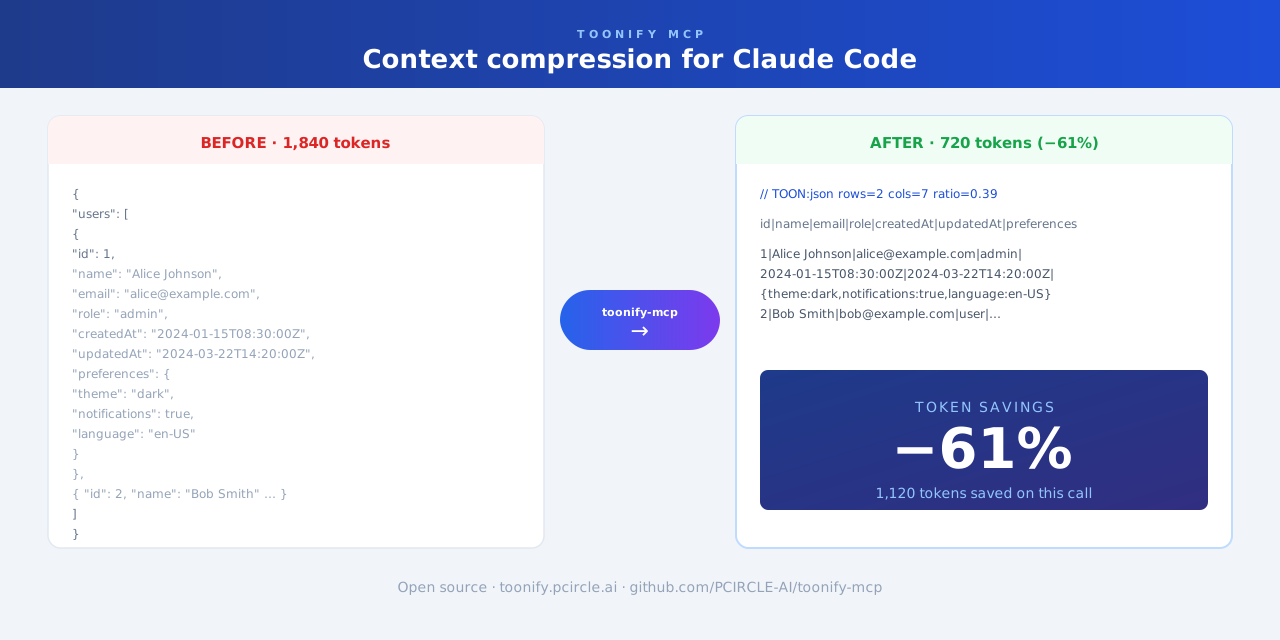
Context compression plugin for Claude Code. Automatically trims large tool output—JSON, CSV, YAML, stack traces, and logs—before it enters the context window.
Works as a Claude Code plugin (automatic, zero-config) or as an MCP server (on-demand).
Features
- Compresses large JSON, CSV, YAML, and API responses
- Reduces long test failures and stack traces
- Runs automatically in the background—no change to your Claude Code workflow required
Limitations
Skipped for short text, very small files, and content where exact original formatting must be preserved.
Installation
git clone https://github.com/PCIRCLE-AI/toonify-mcp.git
cd toonify-mcp
npm install
npm run build
npm install -g .
toonify-mcp setup
toonify-mcp doctor
toonify-mcp setup adds the local marketplace and installs, updates, or re-enables the plugin automatically.
Check status
toonify-mcp status
MCP mode (optional)
toonify-mcp setup mcp
claude mcp list
claude mcp list should show toonify: toonify-mcp - ✓ Connected.
Docs
Reviews
No reviews yet. Be the first.
Related
ponytail
Lazy senior dev mode. Forces the simplest, shortest solution that actually works: YAGNI, stdlib first, no unrequested abstractions.
Claude Mem
Memory compression system for Claude Code - persist context across sessions
chrome-devtools-mcp
Reliable automation, in-depth debugging, and performance analysis in Chrome using Chrome DevTools and Puppeteer
mh install plugins/toonify-mcp