ppt-master
Generate natively editable PPTX from PDF / DOCX / URL / Markdown.
pinned to #9c98a6eupdated 4 months ago
Ask your AI client: “install plugins/ppt-master”.
Requires the metahub MCP server installed in your client. Set up MCP.
mh install plugins/ppt-mastermetahub onboarded this repo on the author's behalf.
If you own github.com/hugohe3/ppt-master on GitHub, claim the listing to take over publishing. Your claim preserves the existing eval history and badges; only the curator label is replaced with verified-publisher on your next publish.
Stars
22,090
Last commit
4 months ago
Latest release
v2.8.0
Releases
2
- #plugin
- #ai-agent
- #aippt
- #office
- #powerpoint
- #powerpoint-generation
- #ppt
- #pptx
- #presentation
- #slide
- #slides
Automated checks the publisher passed at publish time — structure, docs, safety, and whether the artifact behaves as claimed.9c98a6e· 4 months ago
Behavioral checks ran but aren't published for this artifact; the static checks above ran at publish time.
Kind-specific
2 warningsPlugin: manifest fields completewarn
plugin.json is missing: version
Add the missing fields so the catalog detail page is complete.
Plugin: bundled artifacts presentwarn
Couldn't find a skills/ subdir or an MCP server config inside the plugin
A plugin is most useful when it bundles ≥ 1 skill or an MCP server.
Release history
2Contents
English | 中文
<sub>This project is kept free and open source with the support of PackyCode, APIKEY.FUN and other sponsors.</sub>
<table> <tr> <td width="180">[](https://www.packyapi.com/register?aff=ppt-master)</td> <td>Thanks to PackyCode for sponsoring this project! PackyCode is a reliable and efficient API relay service provider, offering relay services for Claude Code, Codex, Gemini, and more. PackyCode provides special discounts for our project users: register using [this link](https://www.packyapi.com/register?aff=ppt-master) and enter the promo code <strong>ppt-master</strong> during recharge to get 10% off.</td> </tr> <tr> <td width="180">[](https://apikey.fun/register?aff=PPT-MASTER)</td> <td>Thanks to APIKEY.FUN for sponsoring this project! APIKEY.FUN is a professional enterprise-grade AI relay service committed to stable, efficient, and low-cost AI access for businesses and developers. The platform supports mainstream models including Claude, OpenAI, and Gemini, with prices as low as <strong>7% of official rates</strong>. Register through [our dedicated link](https://apikey.fun/register?aff=PPT-MASTER) for an exclusive perk: <strong>up to 5% off on top-ups, permanently</strong>.</td> </tr> </table><strong>Live Demo</strong> · <strong>About Hugo He</strong> · <strong>Examples</strong> · <strong>FAQ</strong> · <strong>Roadmap</strong> · <strong>Contact</strong>
Download the new narrated <em>Attention Is All You Need</em> deck — play it in PowerPoint and every slide reads itself out loud. That's just the tip of what PPT Master can do. Of course, you can also download any of the six example decks below — opening the raw .pptx in PowerPoint is the fastest way to see this project's real capability ceiling.
<table> <tr> <td align="center" width="33%"> [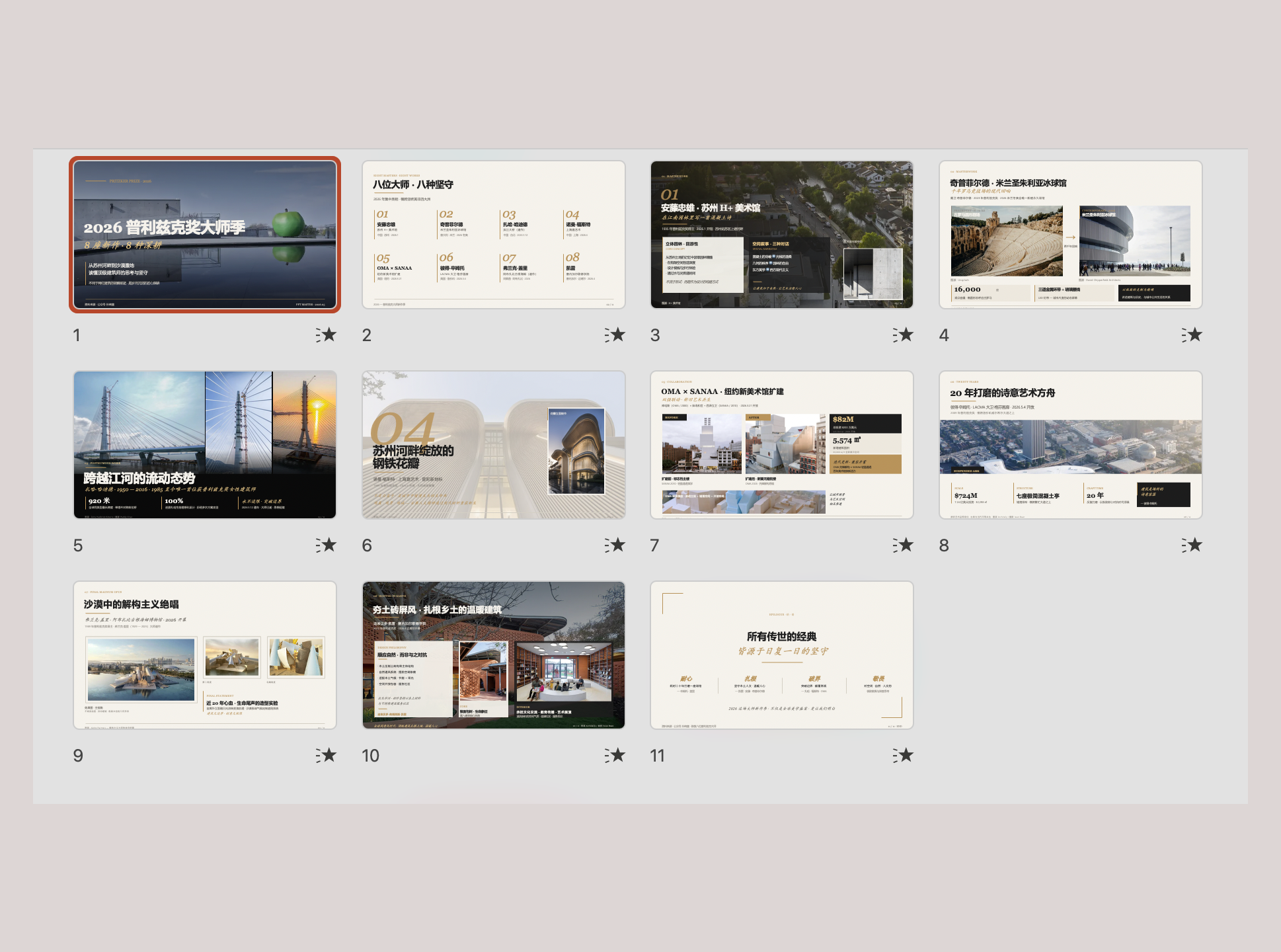](https://hugohe3.github.io/ppt-master/viewer.html?project=ppt169_pritzker_2026) <sub><b>Editorial Magazine</b> — architecture photography, calm typographic grid
[Flip online](https://hugohe3.github.io/ppt-master/viewer.html?project=ppt169_pritzker_2026) · [Download .pptx](https://raw.githubusercontent.com/hugohe3/ppt-master/main/examples/ppt169_pritzker_2026/exports/pritzker_2026.pptx)</sub>
</td>
<td align="center" width="33%">
[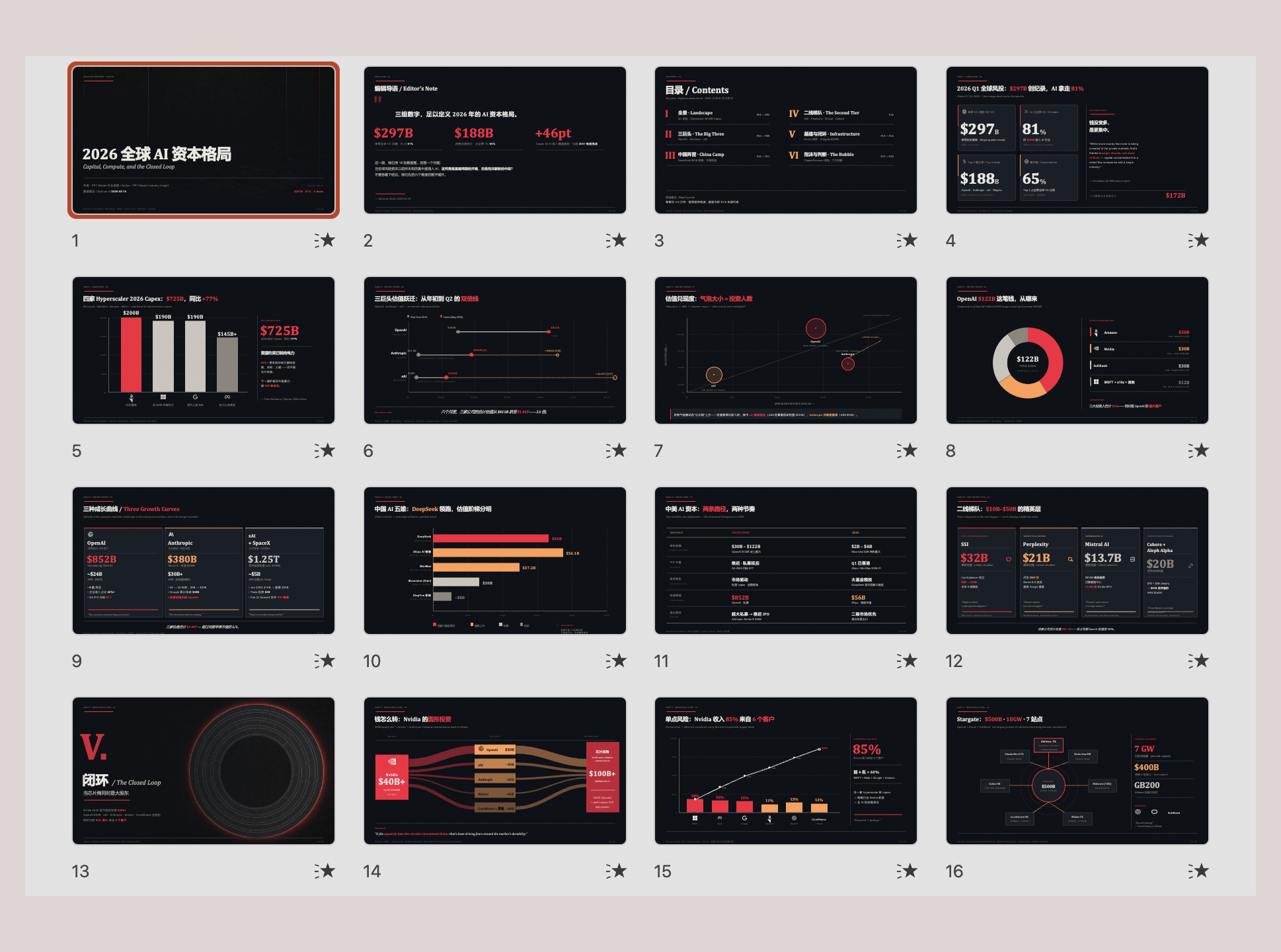](https://hugohe3.github.io/ppt-master/viewer.html?project=ppt169_global_ai_capital_2026)
<sub><b>Data Journalism</b> — Bloomberg-style dark dashboard, chart-driven
[Flip online](https://hugohe3.github.io/ppt-master/viewer.html?project=ppt169_global_ai_capital_2026) · [Download .pptx](https://raw.githubusercontent.com/hugohe3/ppt-master/main/examples/ppt169_global_ai_capital_2026/exports/global_ai_capital_2026.pptx)</sub>
</td>
<td align="center" width="33%">
[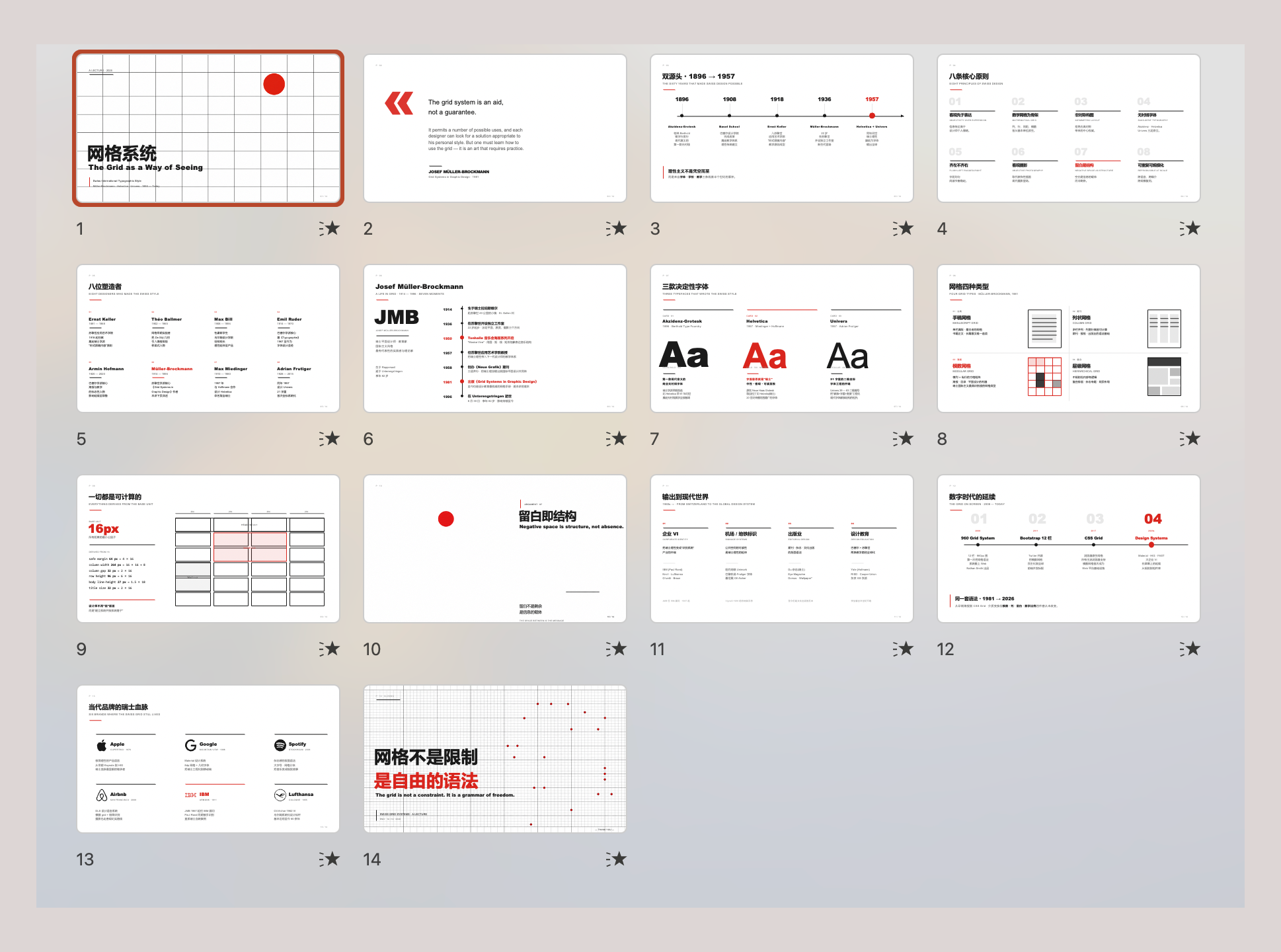](https://hugohe3.github.io/ppt-master/viewer.html?project=ppt169_swiss_grid_systems)
<sub><b>Swiss Grid</b> — strict modular grid, restrained type, red-accent
[Flip online](https://hugohe3.github.io/ppt-master/viewer.html?project=ppt169_swiss_grid_systems) · [Download .pptx](https://raw.githubusercontent.com/hugohe3/ppt-master/main/examples/ppt169_swiss_grid_systems/exports/swiss_grid_systems.pptx)</sub>
</td>
<sub><b>Glassmorphism SaaS</b> — translucent layers, gradient depth, product UI
[Flip online](https://hugohe3.github.io/ppt-master/viewer.html?project=ppt169_glassmorphism_demo) · [Download .pptx](https://raw.githubusercontent.com/hugohe3/ppt-master/main/examples/ppt169_glassmorphism_demo/exports/glassmorphism_demo.pptx)</sub>
</td>
<td align="center" width="33%">
[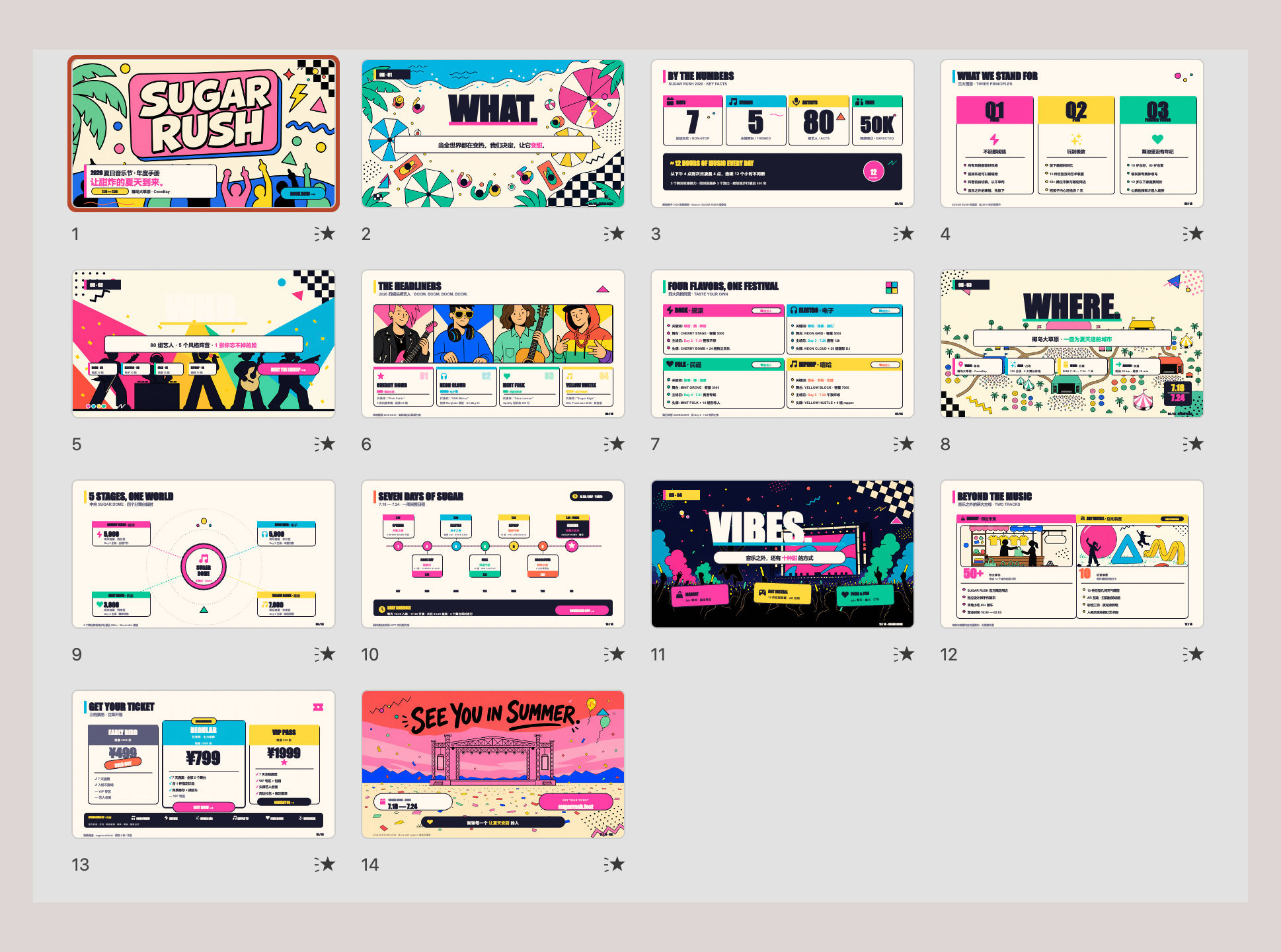](https://hugohe3.github.io/ppt-master/viewer.html?project=ppt169_sugar_rush_memphis)
<sub><b>Memphis Pop</b> — bold primaries, geometric patterns, playful energy
[Flip online](https://hugohe3.github.io/ppt-master/viewer.html?project=ppt169_sugar_rush_memphis) · [Download .pptx](https://raw.githubusercontent.com/hugohe3/ppt-master/main/examples/ppt169_sugar_rush_memphis/exports/sugar_rush_memphis.pptx)</sub>
</td>
<td align="center" width="33%">
[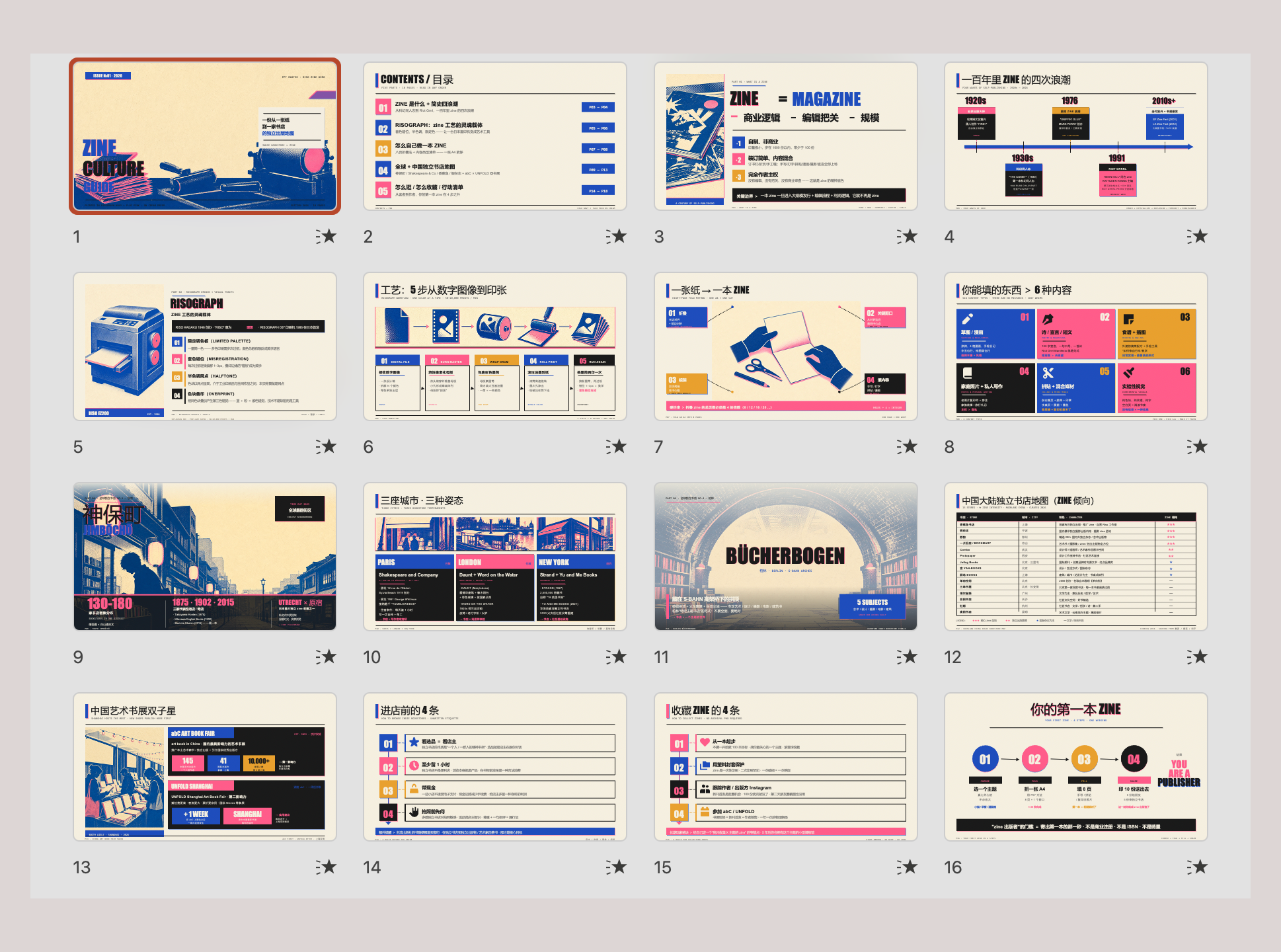](https://hugohe3.github.io/ppt-master/viewer.html?project=ppt169_indie_bookstore_zine_guide)
<sub><b>Risograph Zine</b> — duotone print, hand-made bookstore-culture feel
[Flip online](https://hugohe3.github.io/ppt-master/viewer.html?project=ppt169_indie_bookstore_zine_guide) · [Download .pptx](https://raw.githubusercontent.com/hugohe3/ppt-master/main/examples/ppt169_indie_bookstore_zine_guide/exports/indie_bookstore_zine_guide.pptx)</sub>
</td>
<sub>Generated with Claude Opus 4.7 + <code>gpt-image-2</code>. Flip through all examples online → · <code>examples/</code> directory · Why PPT Master?</sub>
Drop in a PDF, DOCX, URL, or Markdown — get back a natively editable PowerPoint with real shapes, real text boxes, and real charts. Not images. Click anything and edit it.
⚠️ PPT Master is a harness, not a complete agent.
harness + model = agent— the tool owns the workflow; the model sets the ceiling. To form a genuinely high-quality agent, use Claude with a large context window (~1M tokens) + AI image generation (gpt-image-2). Other models can run the pipeline but cannot reach the same quality ceiling. If results disappoint, upgrade the model — don't blame the harness.
Live Preview & Visual Edits — during generation, a browser preview at
http://localhost:5050opens automatically. Click any element, write what to change, hit Submit annotations, then return to the chat and say "apply my annotations" — the AI rewrites the SVG and re-exports the PPTX. Originally PPT Master was chat-only by design, but enough users asked for visual editing that we folded it in. Built on top of @WodenJay's PR #85 — thank you. See Live Preview Workflow →.
Template Replication — hand the AI any
.pptxyou like and say "replicate it as a template via/create-template" — you get a layout set PPT Master can invoke directly. Theme colors, fonts, master/layout structure, reusable images, even sprite-sheet crop relationships are extracted straight from OOXML, so covers, chapter dividers and decoration-heavy pages all reproduce reliably. You're no longer limited to the built-in templates: a company brand deck, a client's winning template, or any high-quality reference can become a private template in your own library. See Templates Guide →.
Animations — exported decks support page transitions and per-element entrance animations as real OOXML, not embedded video. By default, elements cascade in automatically on slide entry — no clicking needed. Plays natively in PowerPoint and Keynote, no extra tooling. See Animations & Transitions →.
Narration & Video — generate per-slide voice narration from the speaker notes (
edge-ttsby default, optional cloud TTS providers for high-quality narration), embed the audio back into the PPTX, and let PowerPoint export the deck as an MP4 video — synced narration + transitions, no third-party tools. See Audio Narration & Video Export →.Voice Cloning — bring your own cloned voice from ElevenLabs / MiniMax / Qwen / CosyVoice and have the entire deck narrated in your voice (or a presenter's, with permission). Clone once in the provider's console, then pass the
voice_id— PPT Master reads every slide's notes in that voice and embeds the result back into the PPTX. See Use a cloned voice →.
How it works — PPT Master is a workflow (a "skill") that works inside AI IDEs like Claude Code, Cursor, VS Code + Copilot, or Codebuddy. You chat with the AI — "make a deck from this PDF" — and it follows the workflow to produce a real editable
.pptxon your computer. No coding on your side; the IDE is just where the conversation happens.What you'll do: install Python, install an AI IDE, drop in your material.
Why it's shaped this way — knowing how to use Python and AI agents will matter more and more. This project is meant to show how far you can go with just those two things. There's a learning curve if you're starting cold, but it's the curve worth climbing. Making a deck is just the excuse — what I'm really pushing is Python and agents.
PPT Master is different:
- Real PowerPoint — if a file can't be opened and edited in PowerPoint, it shouldn't be called a PPT. Every element PPT Master outputs is directly clickable and editable
- Transparent, predictable cost — the tool is free and open source; the only cost is your AI model usage. As AI tools move to usage-based billing, you pay exactly what you consume — no separate PPT subscription added on top
- Data stays local — your files shouldn't have to be uploaded to someone else's server just to make a presentation. Apart from AI model communication, the entire pipeline runs on your machine
- No platform lock-in — your workflow shouldn't be held hostage by any single company. Works with Claude Code, Cursor, VS Code Copilot, and more; supports Claude, GPT, Gemini, Kimi, and other models
AI presentation tools roughly fall into four categories. PPT Master only does the last one:
| Category | Output | Editable element-by-element in PowerPoint? |
|---|---|---|
| Template fill-in | PPTX built from a fixed template | Partially — limited by the template |
| Image-based | One large image per slide, packed into PPTX | ❌ each slide is a picture |
| HTML presentation | Web-based deck | ❌ not a PPTX |
| Native editable (PPT Master) | Real DrawingML shapes, text boxes, charts | ✅ click any element to edit |
Built by Hugo He
I'm a finance professional (CPA · CPV · Consulting Engineer (Investment)) who regularly reviews and edits presentation decks. I wanted AI-generated slides to remain editable in PowerPoint, not flattened into images — so I built this.
🌐 Personal website · 📧 [email protected] · 🐙 @hugohe3
Quick Start
1. Prerequisites
You only need Python. Everything else is installed via pip install -r requirements.txt.
| Dependency | Required? | What it does |
|---|---|---|
| Python 3.10+ | ✅ Yes | Core runtime — the only thing you actually need to install |
TL;DR — Install Python, run
pip install -r requirements.txt, and you're ready to generate presentations.
<strong>Windows</strong> — see the dedicated step-by-step guide ⚠️
Windows requires a few extra steps (PATH setup, execution policy, etc.). We wrote a step-by-step guide specifically for Windows users:
📖 Windows Installation Guide — from zero to a working presentation in 10 minutes.
Quick version: download Python from python.org → check "Add to PATH" during install → pip install -r requirements.txt → done.
<strong>macOS / Linux</strong> — install and go
# macOS
brew install python
pip install -r requirements.txt

# Ubuntu / Debian
sudo apt install python3 python3-pip
pip install -r requirements.txt
<strong>Edge-case fallback</strong> — 99% of users don't need this
Pandoc — only needed for legacy document formats: .doc, .odt, .rtf, .tex, .rst, .org, or .typ. .docx, .html, .epub, .ipynb are handled natively by Python — no pandoc required.
# macOS
brew install pandoc

# Ubuntu / Debian
sudo apt install pandoc
2. Pick an Agent
PPT Master runs in any tool with agent capability — read/write files, execute commands, and sustain multi-turn conversation.
| Type | Examples | Notes |
|---|---|---|
| IDE-native agent | • VS Code architecture (VS Code itself, plus forks & derivatives): Cursor, Trae, Codebuddy IDE, Windsurf, Void, etc. | |
| • Other architectures: Zed, etc. | Editor with a built-in agent | |
| IDE plugin / extension | GitHub Copilot, Claude Code (VS Code / JetBrains extension), Cline, Continue, Roo Code, etc. | Installed inside hosts like VS Code or JetBrains |
| CLI agent | Claude Code CLI, Codex CLI, Aider, Gemini CLI, etc. | Runs in the terminal; suits scripting, remote, or server use |
Model recommendation: prefer Claude Opus / Sonnet with a large context window and
gpt-image-2for images — see the note above for why.
🔑 Want to use Claude / GPT / Gemini but don't have access yet? Project sponsors PackyCode and APIKEY.FUN can help — both offer pay-as-you-go access to Claude, GPT, Gemini and more, no subscription required. PackyCode: 10% off with promo code ppt-master at top-up. APIKEY.FUN: prices as low as 7% of official rates; register via our link for an exclusive permanent discount of up to 5% on top-ups.
3. Set Up
Option A — Download ZIP (no Git required): click Code → Download ZIP on the GitHub page, then unzip.
Option B — Git clone (requires Git installed):
git clone https://github.com/hugohe3/ppt-master.git
cd ppt-master
Then install dependencies:
pip install -r requirements.txt
To update later (Option A / B): python3 skills/ppt-master/scripts/update_repo.py
Option C — Skill marketplace: the repo ships
.claude-plugin/marketplace.json, so it can be installed through the Claude Code plugin marketplace ecosystem:# Cross-agent CLI (Claude Code, Cursor, Codex, etc.) npx skills add hugohe3/ppt-master # Or inside Claude Code /plugin marketplace add hugohe3/ppt-master /plugin install ppt-master@ppt-masterBoth install paths above only fetch the skill files (not the full repo); you still need to
pip install -r requirements.txtfrom the installed location for the post-processing scripts to run.
4. Create
Provide source materials (recommended): Place your PDF, DOCX, images, or other files in the projects/ directory, then tell the AI chat panel which files to use. The quickest way to get the path: right-click the file in your file manager or IDE sidebar → Copy Path (or Copy Relative Path) and paste it directly into the chat.
You: Please create a PPT from projects/q3-report/sources/report.pdf
Paste content directly: You can also paste text content straight into the chat window and the AI will generate a PPT from it.
You: Please turn the following into a PPT: [paste your content here...]
Either way, the AI will first confirm the design spec:
AI:  Sure. Let's confirm the design spec:
     [Template] B) Free design
     [Format]   PPT 16:9
     [Pages]    8-10 pages
     ...
The AI handles everything — content analysis, visual design, SVG generation, and PPTX export.
Output: Native-shapes
.pptx(directly editable) saved toexports/<name>_<timestamp>.pptx. A copy ofsvg_output/is always snapshotted tobackup/<timestamp>/svg_output/for re-export / archival. Pass--svg-snapshotto additionally emit an SVG-image preview pptx alongside the native pptx inexports/(see FAQ). Requires Office 2016+.
AI lost context? Ask it to read
skills/ppt-master/SKILL.md.
Something went wrong? Check the FAQ — it covers model selection, layout issues, export problems, and more. Continuously updated from real user reports.
5. Image Acquisition (Optional)
Two paths for non-user images, mixable per row in the same deck:
For API-backed features, put credentials in .env. Clone installs can use cp .env.example .env; skill marketplace installs should use a persistent user config:
mkdir -p ~/.ppt-master
cp /path/to/installed/ppt-master/.env.example ~/.ppt-master/.env
PPT Master reads the current process environment first, then the first .env found in this order: current working directory, skill directory (e.g. ~/.agents/skills/ppt-master/.env), clone repo root, ~/.ppt-master/.env.
A) AI generation — image_gen.py. Set IMAGE_BACKEND plus the provider's *_API_KEY (OPENAI_API_KEY, GEMINI_API_KEY, etc.), and the pipeline calls it automatically. Run python3 skills/ppt-master/scripts/image_gen.py --list-backends for the full backend list. gpt-image-2 is currently the best default.
B) Web image search — image_search.py. Zero-config works, but configure PEXELS_API_KEY / PIXABAY_API_KEY (both free) for higher-quality results. Without keys, search uses Openverse / Wikimedia Commons only; this is useful as a fallback, but image quality can be uneven because many results are ordinary user uploads. With keys, the default provider chain also appends Pexels / Pixabay, which materially improves modern stock photography, people, workplace, lifestyle, and illustration coverage. The default is quality-first: CC0, Public Domain, Pexels / Pixabay no-attribution licenses, CC BY, and CC BY-SA are considered together, and Executor adds a small inline credit whenever the selected image requires attribution. Use --strict-no-attribution only when a slide cannot tolerate any credit line. For high-impact covers, product shots, portraits, and branded scenes, prefer this order: user-provided high-resolution assets / AI generation > web search with Pexels / Pixabay keys > zero-config web search.
Full reference:
image-generator.md(AI) ·image-searcher.md(web).
Documentation
| Document | Description | |
|---|---|---|
| 🆚 | Why PPT Master | How it compares to Gamma, Copilot, and other AI tools |
| 🪟 | Windows Installation | Step-by-step setup guide for Windows users |
| 📖 | SKILL.md | Core workflow and rules |
| 🎨 | Templates Guide | Use, derive (the focus), and template boundaries; covers standard vs fidelity modes |
| 📐 | Canvas Formats | PPT 16:9, Xiaohongshu, WeChat, and 10+ formats |
| 🎬 | Animations & Transitions | Page transitions and per-element entrance animations |
| 🎙️ | Audio Narration & Video Export | TTS narration in 90+ locales, embed audio, export as MP4 |
| 🛠️ | Scripts & Tools | All scripts and commands |
| 💼 | Examples | All example projects |
| 🏗️ | Technical Design | Architecture, design philosophy, why SVG |
| ❓ | FAQ | Model selection, cost, layout troubleshooting, custom templates |
Contributing
See CONTRIBUTING.md for how to get involved.
License
Acknowledgments
SVG Repo · Tabler Icons · Simple Icons · Phosphor Icons · Robin Williams (CRAP principles)
Contact & Collaboration
Looking to collaborate, integrate PPT Master into your workflow, or just have questions?
- 💬 Questions & sharing — GitHub Discussions
- 🐛 Bug reports & feature requests — GitHub Issues
- 🌐 Learn more about the author — www.hehugo.com
Star History
[
](https://star-history.com/#hugohe3/ppt-master&Date)
Sponsors & Support
PPT Master is currently built and maintained primarily by me. Every new template, bug fix, and documentation update takes ongoing resources — currently shared by the sponsors and individual supporters below.
Corporate sponsors



Individual support
If PPT Master has been helpful to you, individual support of any amount helps keep the project moving and free.


Made with ❤️ by Hugo He — if this project helps you, please give it a ⭐ and consider sponsoring.
<sub>Official distribution: GitHub (primary) · AtomGit (mirror). Redistributions on other platforms are unofficial. MIT licensed — attribution required.</sub>
Reviews
No reviews yet. Be the first.
Related
ECC
Harness-native ECC plugin for engineering teams - 63 agents, 249 skills, 79 legacy command shims, reusable hooks, rules, MCP conventions, and operator workflows for Claude Code plus adjacent agent harnesses
career-ops
AI job search command center — evaluate offers, generate CVs, scan portals, track applications
Claude Mem
Memory compression system for Claude Code - persist context across sessions
mh install plugins/ppt-master