open-plan-annotator
Interactive plan annotation UI: review, strikethrough, and comment on Claude's plans before approving. Fully local, no external services.
pinned to #b9687c1updated 3 months ago
Ask your AI client: “install plugins/open-plan-annotator”.
Requires the metahub MCP server installed in your client. Set up MCP.
mh install plugins/open-plan-annotatormetahub onboarded this repo on the author's behalf.
If you own github.com/ndom91/open-plan-annotator on GitHub, claim the listing to take over publishing. Your claim preserves the existing eval history and badges; only the curator label is replaced with verified-publisher on your next publish.
Stars
74
Last commit
3 months ago
Latest release
published
- #agentic-ai
- #ai
- #claude-code-plugin
- #coding-agent
- #opencode-plugin
- #pi-extension
- #plan-mode
What's bundled
Items extracted from this plugin's manifest + directory tree.
Skills (1)
skills/plan-review-triggersRequired reading whenever drafting any multi-step proposal, implementation plan, refactor approach, or response containing file paths and decision points. Use BEFORE writing any response that lists…
Commands (1)
/annotate-planThe user wants a plan drafted and reviewed via the open-plan-annotator UI before any implementation. This is required, not optional.
Automated checks the publisher passed at publish time — structure, docs, safety, and whether the artifact behaves as claimed.b9687c1· 3 months ago
Behavioral checks haven't run yet: the sandbox couldn't execute this artifact (it may need credentials we don't provide, or an unsupported build). An environment limit, not a verdict.
Select a category above to see its individual checks.
Release history
1- releasecurrentb9687c1pass3 months ago
Contents
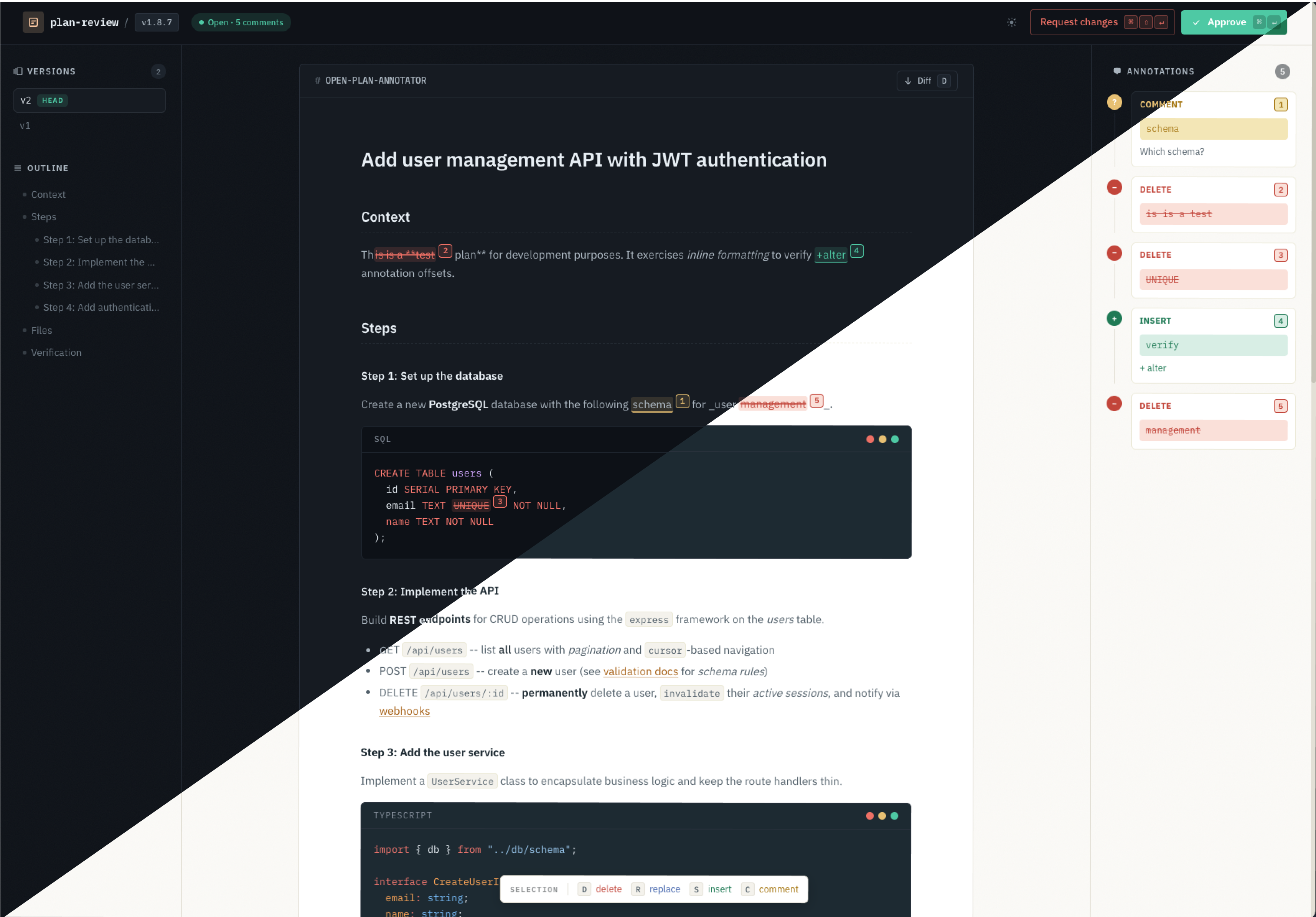
A fully local agentic coding plugin that intercepts plan mode and opens an annotation UI in your browser. Mark up the plan, send structured feedback to the agent, and receive a revised version — iterate as many times as you need until you're ready to approve.
Select text to <code>strikethrough</code>, <code>replace</code>, <code>insert</code>, or <code>comment</code> — then approve the plan or request changes
How It Works
- Your coding agent (Claude Code, OpenCode, and pi) finishes writing a plan
- The plugin launches an ephemeral HTTP server and opens a React UI in your browser
- You review the plan and annotate it — strikethrough, replace, insert, or comment on any section
- Approve to let the agent proceed, or Request Changes to send your annotations back as structured feedback
- The agent revises the plan and the cycle repeats until you're satisfied
Everything runs locally.
Install
open-plan-annotator is package-managed as a plugin within your harness of choice. The main plugin package then installs the specific local platform runtime it needs for your host (linux/darwin, x86_64/arm64, etc). After installing the plugin, your agent will call open-plan-annotator autonomously when you ask it to "make a plan" or any similar such comment, including in claude-code specifically as a hook when exiting PlanMode. Alternatively, you can call it yourself explicitly via the exposed command. See below for more details.
Claude Code
Install from inside Claude Code:
/plugin marketplace add ndom91/open-plan-annotator
/plugin install open-plan-annotator@ndom91-open-plan-annotator
What you get:
ExitPlanModehook: opens the annotation UI whenever Claude submits a plan/annotate-plan [task description]: asks Claude to draft a plan and send it to the UIopen-plan-annotator: runtime command invoked by the hook
Third-party marketplace auto-update is disabled by default in Claude Code. Enable auto-update for the ndom91-open-plan-annotator marketplace in the Marketplace UI if you want updates automatically.
OpenCode
Add the plugin to your OpenCode config (opencode.json or .opencode/config.json):
{
  "plugin": ["[email protected]"]
}
What you get:
annotate_plan: tool the agent calls after drafting a markdown planopen-plan-annotator: runtime command spawned by the plugin- optional implementation-agent handoff after approval
Restart OpenCode after installing or updating so it reloads the package-managed runtime.
Pi
Install the Pi extension:
pi install npm:@open-plan-annotator/pi-extension
What you get:
annotate_plan: tool the agent calls after drafting a markdown plan/annotate-plan [plan markdown]: command for manually reviewing supplied text or the latest assistant messageopen-plan-annotator: runtime command used by the extension
Manual review examples:
/annotate-plan
/annotate-plan # Plan\n\n1. Do the thing
Manual / CLI
Install globally if you want to run the CLI directly:
bun add -g open-plan-annotator
npm install -g open-plan-annotator
This adds the open-plan-annotator command. To verify the resolved runtime:
open-plan-annotator doctor
You can also review a Markdown plan directly from disk, which is useful for agents without a native plugin:
open-plan-annotator review /absolute/path/to/plan.md
The command opens the same local review UI and blocks until approval or requested changes. It prints review result JSON to stdout when the user is done.
Generic agent setup instructions are available with:
open-plan-annotator agent-setup
open-plan-annotator help agent
Updates
- Claude Code: navigate to the
/plugin-> "Installed" ->open-plan-annotatorentry and select "Update", then restart Claude Code. - OpenCode: bump the version number in your
opencode.jsoncpluginsopen-plan-annotatorentry, then restart OpenCode. - Pi: update the Pi extension, then restart Pi.
- Manual/global install: update the npm package, then rerun
open-plan-annotator.
Keyboard Shortcuts
| Action | Shortcut | Description |
|---|---|---|
| Delete | d | Strikethrough selected text |
| Replace | r | Replace selected text with new content |
| Insert | s | Insert text after the selection |
| Comment | c | Attach a comment to selected text |
| Approve | Cmd+Enter | Approve the plan and proceed |
| Request Changes | Cmd+Shift+Enter | Send annotations back to the agent |
Development
bun run dev
Starts the Bun server on port 3847 with a test plan and the Vite dev server on port 5173 with HMR.
bun run lint        # check
bun run lint:fix    # auto-fix
bun run format      # format
Maintainer Docs
- Architecture:
docs/architecture.md - Operations:
docs/operations.md - Release process:
docs/release.md
License
MIT
Reviews
No reviews yet. Be the first.
Related
Claude Mem
Memory compression system for Claude Code - persist context across sessions
ponytail
Lazy senior dev mode. Forces the simplest, shortest solution that actually works: YAGNI, stdlib first, no unrequested abstractions.
taste-skill
Frontend design taste skills including brutalist, minimalist, soft, redesign, stitch, and more
mh install plugins/open-plan-annotator