iterm2-tab-status
Show iTerm2 tab status (running/idle/attention) for Claude Code sessions
pinned to #ca4df11updated 3 months ago
Ask your AI client: “install plugins/iterm2-tab-status”.
Requires the metahub MCP server installed in your client. Set up MCP.
mh install plugins/iterm2-tab-statusmetahub onboarded this repo on the author's behalf.
If you own github.com/JasperSui/claude-code-iterm2-tab-status on GitHub, claim the listing to take over publishing. Your claim preserves the existing eval history and badges; only the curator label is replaced with verified-publisher on your next publish.
Stars
34
Last commit
3 months ago
Latest release
published
- #claude-code
- #claude-code-plugin
- #cli-tools
- #developer-tools
- #iterm2
- #macos
- #productivity
- #terminal
What's bundled
Items extracted from this plugin's manifest + directory tree.
Commands (3)
/configRead the current config file at `~/.config/claude-tab-status/config.json` (create the directory if it doesn't exist). Merge with these defaults for any missing keys:/setupRun the iTerm2 tab status bootstrap script to set up the Python runtime and deploy the adapter./uninstallClean up all iterm2-tab-status artifacts from the system:
Automated checks the publisher passed at publish time — structure, docs, safety, and whether the artifact behaves as claimed.ca4df11· 3 months ago
Kind-specific
3 passed1 warningPlugin: bundled artifacts presentwarn
Couldn't find a skills/ subdir or an MCP server config inside the plugin
A plugin is most useful when it bundles ≥ 1 skill or an MCP server.
Plugin: manifest fields complete
Plugin: bundle shape
3 commands
Plugin: manifest location
manifest at .claude-plugin/plugin.json (modern convention)
Release history
1- releasecurrentca4df11warn3 months ago
Contents
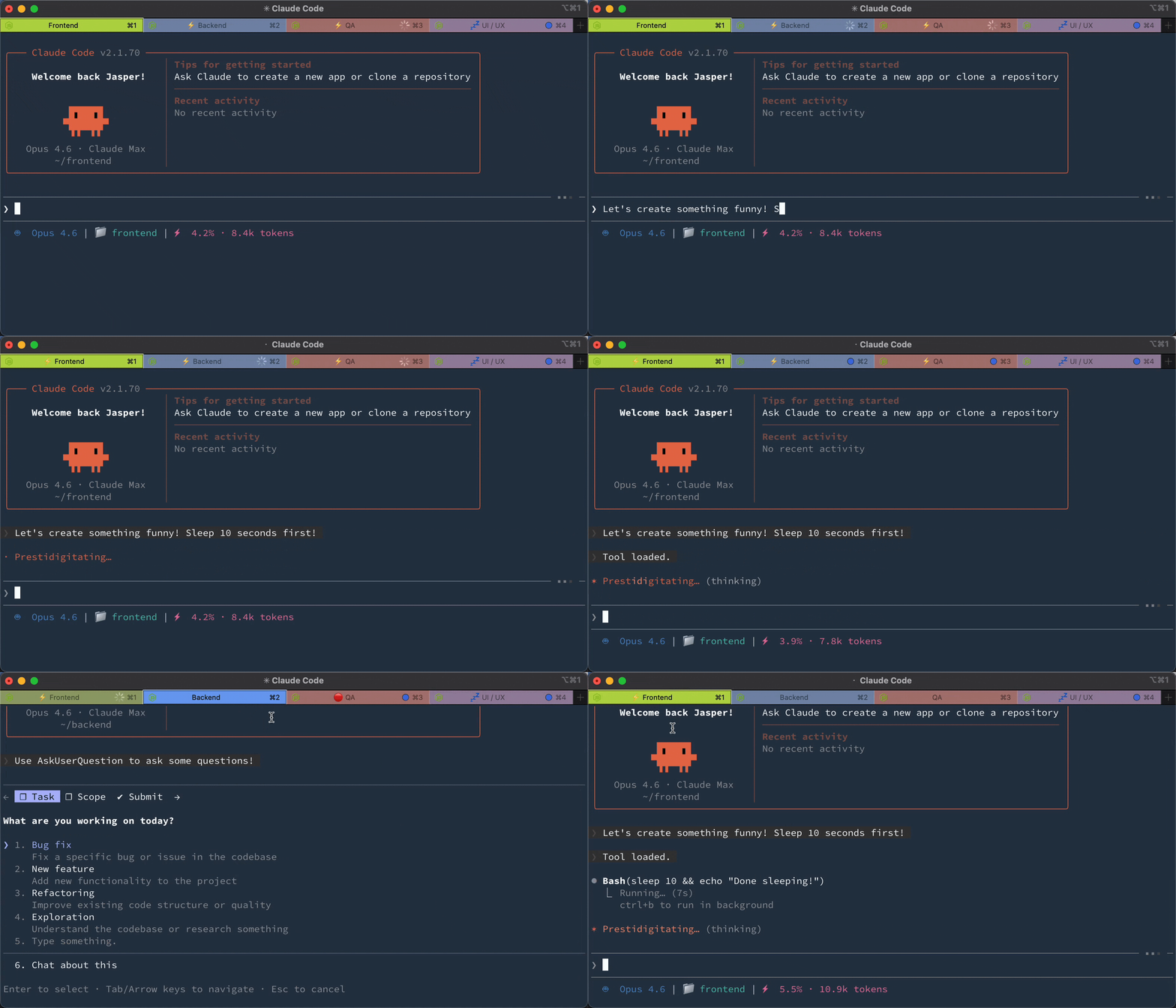
See what every Claude Code session is doing. Each iTerm2 tab shows a status prefix. ⚡ running, 💤 idle, or 🔴 needs attention (with flashing).
Installation
Claude Code (via Plugin Marketplace)
In Claude Code, register the marketplace first:
/plugin marketplace add JasperSui/jaspersui-marketplace
Then install the plugin from this marketplace:
/plugin install iterm2-tab-status@jaspersui-marketplace
On first session start, the plugin automatically:
- Creates an iTerm2 Python runtime (if not already installed)
- Deploys the adapter script to iTerm2 AutoLaunch
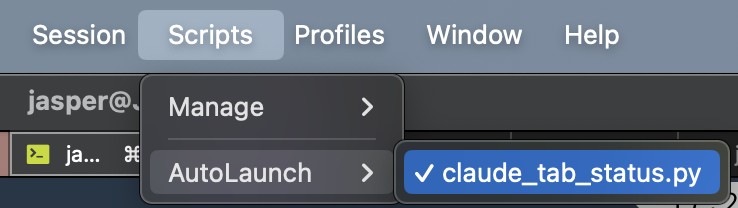
After the first session, restart iTerm2 (or toggle Scripts → AutoLaunch → claude_tab_status.py twice).
Updating
To update to the latest release:
claude plugin update iterm2-tab-status@jaspersui-marketplace
This re-fetches the plugin and installs the newest version on its own — you do not need to run /plugin marketplace update first (that only refreshes the catalog listing). After updating, restart the iTerm2 adapter (close and reopen iTerm2, or toggle Scripts → AutoLaunch → claude_tab_status.py) so it picks up any adapter-side changes.
See CHANGELOG.md for what's in each release.
Manual Setup
If auto-bootstrap didn't work, run:
/iterm2-tab-status:setup
Uninstall
Run in Claude Code:
/iterm2-tab-status:uninstall
Then remove the plugin:
claude plugin uninstall iterm2-tab-status
Three states
| State | Prefix | Tab Color | Badge | Dismiss on Focus |
|---|---|---|---|---|
| Running — Claude is processing | ⚡ | No change | No | No |
| Idle — Claude finished | 💤 | No change | No | No |
| Attention — needs permission | 🔴 | Flashes orange | Yes | Yes |
Lifecycle: User submits → ⚡ → Claude finishes → 💤 → User submits → ⚡ → Claude needs permission → 🔴 flash! → User focuses → cleared
Your original tab color, title, and badge are saved and restored.
Prefer the prefix/badge without the color flash? Set "flash_enabled": false — the badge and notification still fire, just no tab-color flash. It's hot-reloaded, so toggling it off also stops a flash that's already in progress.
How it works
Claude Code hooks → JSON signal file → iTerm2 adapter → tab status
No screen scraping. Claude Code's official hooks API writes a signal file on every event. The unified hook handles both UserPromptSubmit (→ running) and Notification (→ idle/attention). The iTerm2 adapter polls for signal files and sets the matching tab's prefix, color, and badge by TTY. Only the attention state flashes and shows a badge — running and idle are informational prefixes that persist.
Configuration
The easiest way to configure is with the slash command in Claude Code:
/iterm2-tab-status:config
This opens an interactive prompt to change flash color, prefixes, badge, notifications, and more.
Config file
Settings are stored in ~/.config/claude-tab-status/config.json. Example with all keys and their defaults:
{
  "dir": "~/.cache/claude-tab-status",
  "color_r": 255,
  "color_g": 140,
  "color_b": 0,
  "interval": 0.6,
  "flash_enabled": true,
  "prefix_running": "⚡ ",
  "prefix_idle": "💤 ",
  "prefix_attention": "🔴 ",
  "display_target": "title",
  "subtitle_activity_source": "off",
  "badge": "⚠️ Needs input",
  "badge_enabled": true,
  "notify": false,
  "sound": "",
  "signal_max_age": 1800
}
The config file is hot-reloaded — changes take effect within ~1 second, no restart needed.
Priority order
Settings are resolved in this order (highest wins):
- Environment variable (e.g.
export CLAUDE_ITERM2_TAB_STATUS_COLOR_R=255) - Config file (
~/.config/claude-tab-status/config.json) - Built-in defaults
Environment variables are useful for CI or per-machine overrides without touching the config file.
Display target
By default, status is shown as a tab title prefix.
Set "display_target": "subtitle" to leave the main tab title alone and write status to the iTerm2 user variable user.claudeStatus. In iTerm2, open Settings > Profiles > General and set Subtitle to:
\(user.claudeStatus)
Use "display_target": "both" to update both the title prefix and subtitle variable.
Set "subtitle_activity_source": "prompt" to append a compact, sanitized activity snippet
to the subtitle, such as ⚡ Run tests. The default is "off", which keeps subtitle
output status-only and does not persist prompt text in signal files. Prompt snippets are
opt-in because Claude Code's UserPromptSubmit hook payload includes the submitted
prompt.
Claude Code can also set terminal titles. If you want iTerm2 to control the main title while this plugin updates the subtitle, add this to your shell startup file:
export CLAUDE_CODE_DISABLE_TERMINAL_TITLE=1
Environment variable reference
| Variable | Default | Description |
|---|---|---|
CLAUDE_ITERM2_TAB_STATUS_DIR | $XDG_RUNTIME_DIR/claude-tab-status or ~/.cache/claude-tab-status | Signal file directory (per-user, mode 0700) |
CLAUDE_ITERM2_TAB_STATUS_COLOR_R | 255 | Flash color red (0-255) |
CLAUDE_ITERM2_TAB_STATUS_COLOR_G | 140 | Flash color green (0-255) |
CLAUDE_ITERM2_TAB_STATUS_COLOR_B | 0 | Flash color blue (0-255) |
CLAUDE_ITERM2_TAB_STATUS_INTERVAL | 0.6 | Flash interval in seconds |
CLAUDE_ITERM2_TAB_STATUS_FLASH_ENABLED | true | Enable/disable tab-color flash (attention only) |
CLAUDE_ITERM2_TAB_STATUS_PREFIX_RUNNING | ⚡ | Running state prefix |
CLAUDE_ITERM2_TAB_STATUS_PREFIX_IDLE | 💤 | Idle state prefix |
CLAUDE_ITERM2_TAB_STATUS_PREFIX_ATTENTION | 🔴 | Attention state prefix |
CLAUDE_ITERM2_TAB_STATUS_DISPLAY_TARGET | title | Where to show status: title, subtitle, or both |
CLAUDE_ITERM2_TAB_STATUS_SUBTITLE_ACTIVITY_SOURCE | off | Subtitle activity source: off or prompt |
CLAUDE_ITERM2_TAB_STATUS_BADGE | ⚠️ Needs input | Badge text (attention only) |
CLAUDE_ITERM2_TAB_STATUS_BADGE_ENABLED | true | Enable/disable badge (attention only) |
CLAUDE_ITERM2_TAB_STATUS_NOTIFY | false | macOS notification (attention only) |
CLAUDE_ITERM2_TAB_STATUS_SOUND | (empty) | Sound file path (attention only) |
CLAUDE_ITERM2_TAB_STATUS_SIGNAL_MAX_AGE | 1800 | Reclaim signals not refreshed within N seconds (0 disables) |
CLAUDE_ITERM2_TAB_STATUS_LOG | WARNING | Log level (DEBUG, INFO, WARNING, ERROR) |
Troubleshooting
Tab doesn't show status — Check that the iTerm2 Python Runtime is installed. Verify signal files are created: ls "${XDG_RUNTIME_DIR:-$HOME/.cache}/claude-tab-status/" after Claude goes idle. Set export CLAUDE_ITERM2_TAB_STATUS_LOG=DEBUG and check iTerm2's script console (Scripts → Manage → Console).
Wrong tab gets prefix — The TTY in the signal file doesn't match the iTerm2 session. Restart iTerm2.
Tab stuck on a stale status (e.g. still showing 🔴 attention after you've responded) — A signal is reclaimed when its PID dies, but the recorded PID is the long-lived login shell, so a signal left behind by a session that has moved on can persist while the tab stays open. The adapter also expires any signal not refreshed within signal_max_age seconds (default 1800); lower it (e.g. "signal_max_age": 600) to clear stuck statuses sooner, or set 0 to disable age-based expiry.
Contributing
See CONTRIBUTING.md.
License
If this plugin saves you tab-switching time, consider giving it a ⭐!
Reviews
No reviews yet. Be the first.
Related
ECC
Harness-native ECC plugin for engineering teams - 63 agents, 249 skills, 79 legacy command shims, reusable hooks, rules, MCP conventions, and operator workflows for Claude Code plus adjacent agent harnesses
ponytail
Lazy senior dev mode. Forces the simplest, shortest solution that actually works: YAGNI, stdlib first, no unrequested abstractions.
agentic-bundle-aas-accessibility-inclusive-ux
Editorial "AAS Accessibility & Inclusive UX" bundle for Claude Code from Agentic Awesome Skills.
mh install plugins/iterm2-tab-status