hyper-mcp
A fast, secure MCP server that extends its capabilities through WebAssembly plugins
pinned to #af5436cupdated 3 months ago
Ask your AI client: “install plugins/hyper-mcp”.
Requires the metahub MCP server installed in your client. Set up MCP.
mh install plugins/hyper-mcpmetahub onboarded this repo on the author's behalf.
If you own github.com/hyper-mcp-rs/hyper-mcp on GitHub, claim the listing to take over publishing. Your claim preserves the existing eval history and badges; only the curator label is replaced with verified-publisher on your next publish.
Stars
879
Last commit
3 months ago
Latest release
published
- #ai
- #extism
- #llm
- #mcp
- #mcp-server
- #oci
Automated checks the publisher passed at publish time — structure, docs, safety, and whether the artifact behaves as claimed.af5436c· 3 months ago
Kind-specific
3 passed1 warningPlugin: bundled artifacts presentwarn
Couldn't find a skills/ subdir or an MCP server config inside the plugin
A plugin is most useful when it bundles ≥ 1 skill or an MCP server.
Plugin: manifest fields complete
Plugin: bundle shape
empty bundle
Plugin: manifest location
manifest at plugin.json
Release history
1- releasecurrentaf5436cwarn3 months ago
Contents
hyper-mcp
A fast, secure MCP server that extends its capabilities through WebAssembly plugins.
What is it?
hyper-mcp makes it easy to add AI capabilities to your applications. It works with Claude Desktop, Cursor IDE, and other MCP-compatible apps. Write plugins in your favorite language, distribute them through container registries, and run them anywhere - from cloud to edge.
Features
- Write plugins in any language that compiles to WebAssembly
- Distribute plugins via standard OCI registries (like Docker Hub)
- Built on Extism for rock-solid plugin support
- Sanboxing with WASM: ability to limit network, filesystem, memory access
- Lightweight enough for resource-constrained environments
- Support
stdiotransport protocol - Deploy anywhere: serverless, edge, mobile, IoT devices
- Cross-platform compatibility out of the box
- Support tool name prefix to prevent tool names collision
- Dynamic plugin loading and unloading (configurable)
Security
Built with security-first mindset:
- Sandboxed plugins that can't access your system without permission
- Memory-safe execution with resource limits
- Secure plugin distribution through container registries
- Fine-grained access control for host functions
- OCI plugin images are signed at publish time and verified at load time with sigstore.
Installation
Prerequisites
cosign — required for loading plugins from OCI registries (oci:// URLs).
hyper-mcp verifies the cryptographic signature of every OCI plugin before loading it to ensure the plugin has not been tampered with and comes from a trusted source. This verification is performed by shelling out to the cosign CLI, which must be installed and available on your PATH.
Install cosign by following the official instructions: https://docs.sigstore.dev/cosign/system_config/installation/
Note: If you only use
file://,http://,https://, ors3://plugin URLs, cosign is not needed. You can also bypass signature verification for OCI plugins by settinginsecure_skip_signature: truein your config or theHYPER_MCP_INSECURE_SKIP_SIGNATURE=trueenvironment variable, but this is not recommended for production use.
Install from Homebrew
hyper-mcp is published on Homebrew for macOS and Linux in two places:
Homebrew core — no tap setup required:
brew install hyper-mcp
Our own tap (hyper-mcp-rs/tap) — bumped automatically on every GitHub Release, so it picks up new versions immediately:
brew install hyper-mcp-rs/tap/hyper-mcp
Both install the same binary. Prefer the core formula unless you want the absolute latest release the moment it ships.
Pre-built binaries (GitHub Releases)
Download the latest release for your platform from GitHub Releases:
Chose the version that you want and download the architecture-specific binary.
| Platform | Architecture | Download |
|---|---|---|
| macOS | Apple Silicon (ARM64) | hyper-mcp-aarch64-apple-darwin.tar.gz |
| Linux | ARM64 | hyper-mcp-aarch64-unknown-linux-gnu.tar.gz |
| Linux | x86_64 | hyper-mcp-x86_64-unknown-linux-gnu.tar.gz |
| Windows | x86_64 | hyper-mcp-x86_64-pc-windows-msvc.zip |
macOS / Linux:
Donwload the .tar.gz file, extract it, and place hyper-mcp in /usr/local/bin.
Windows:
Download the .zip file, extract it, and place hyper-mcp.exe somewhere on your PATH.
Install from crates.io
If you have Rust installed, you can install hyper-mcp directly from crates.io:
cargo install hyper-mcp
Getting Started
- Create your config file:
- Linux:
$HOME/.config/hyper-mcp/config.json - Windows:
{FOLDERID_RoamingAppData}\hyper-mcp\config.json. Eg:C:\Users\Alice\AppData\Roaming\hyper-mcp\config.json - macOS:
$HOME/Library/Application Support/hyper-mcp/config.json
- Linux:
{
  "plugins": {
    "time": {
      "url": "oci://ghcr.io/hyper-mcp-rs/time-plugin:latest",
      "description": "Get current time and do time calculations"
    },
    "qr_code": {
      "url": "oci://ghcr.io/hyper-mcp-rs/qrcode-plugin:latest",
      "description": "Generate QR codes from text"
    },
    "hash": {
      "url": "oci://ghcr.io/hyper-mcp-rs/hash-plugin:latest"
    },
    "myip": {
      "url": "oci://ghcr.io/hyper-mcp-rs/myip-plugin:latest",
      "description": "Get your current public IP address",
      "runtime_config": {
        "allowed_hosts": ["1.1.1.1"]
      }
    },
    "fetch": {
      "url": "oci://ghcr.io/hyper-mcp-rs/fetch-plugin:latest",
      "runtime_config": {
        "allowed_hosts": ["*"],
        "memory_limit": "100 MB",
      }
    }
  }
}
📖 For detailed configuration options including authentication setup, runtime configuration, and advanced features, see RUNTIME_CONFIG.md
Supported URL schemes:
oci://- for OCI-compliant registries (like Docker Hub, GitHub Container Registry, etc.). Requires cosign for signature verification (see Prerequisites)file://- for local fileshttp://orhttps://- for remote filess3://- for Amazon S3 objects (requires that you have your AWS credentials set up in the environment)
- Start the server:
$ hyper-mcp
- Uses
stdiotransport protocol. - If you want to debug, use
RUST_LOG=debug. - If you're loading unsigned OCI plugin, you need to set
insecure_skip_signatureflag or env varHYPER_MCP_INSECURE_SKIP_SIGNATUREtotrue
Running in SSE/streamable-http: To do this, wrap
hyper-mcpin one of the many proxies that supports the network transports AND that creates an instance ofhyper-mcpper client connection.
Output Logging
hyper-mcp automatically logs all output to daily rolling log files for debugging and monitoring purposes.
Log Location:
- Linux:
$HOME/.config/hyper-mcp/logs/mcp-server.log - Windows:
{FOLDERID_RoamingAppData}\hyper-mcp\logs\mcp-server.log - macOS:
$HOME/Library/Application Support/hyper-mcp/logs/mcp-server.log
Custom Log Path:
You can override the default log directory by setting the HYPER_MCP_LOG_PATH environment variable:
export HYPER_MCP_LOG_PATH=/path/to/your/logs
hyper-mcp
Log Levels:
Control the verbosity of logs using the RUST_LOG environment variable:
# Info level (default)
RUST_LOG=info hyper-mcp

# Debug level (verbose, useful for troubleshooting)
RUST_LOG=debug hyper-mcp

# Warn level (only warnings and errors)
RUST_LOG=warn hyper-mcp
Features:
- Daily log rotation (new file created each day)
- Non-blocking writes to prevent performance impact
- Includes timestamps, line numbers, and target information
- Safe for use with stdio transport (logs don't interfere with MCP communication)
Using with Cursor IDE
You can configure hyper-mcp either globally for all projects or specifically for individual projects.
- For project-scope configuration, create
.cursor/mcp.jsonin your project root:
{
  "mcpServers": {
    "hyper-mcp": {
      "command": "/path/to/hyper-mcp"
    }
  }
}
-
Set up hyper-mcp in Cursor's settings:
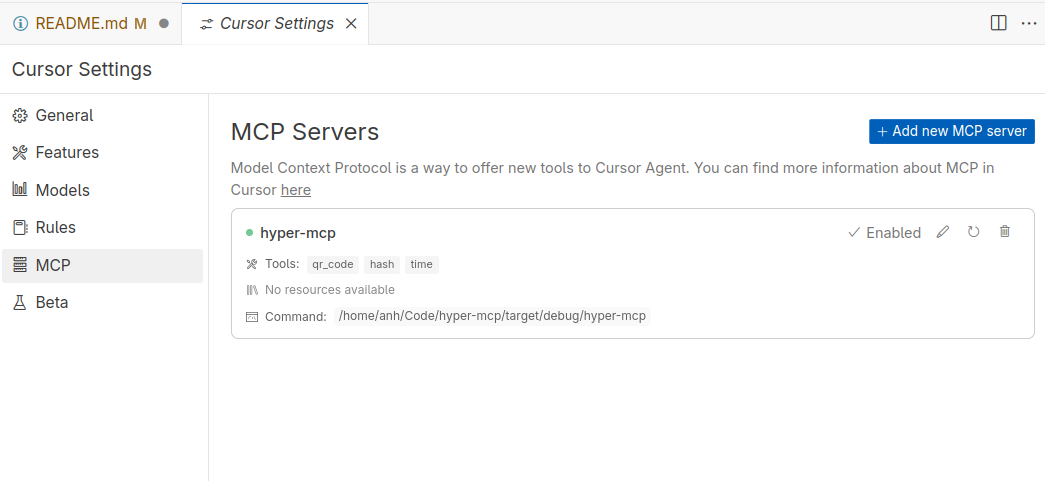
-
Start using tools through chat:
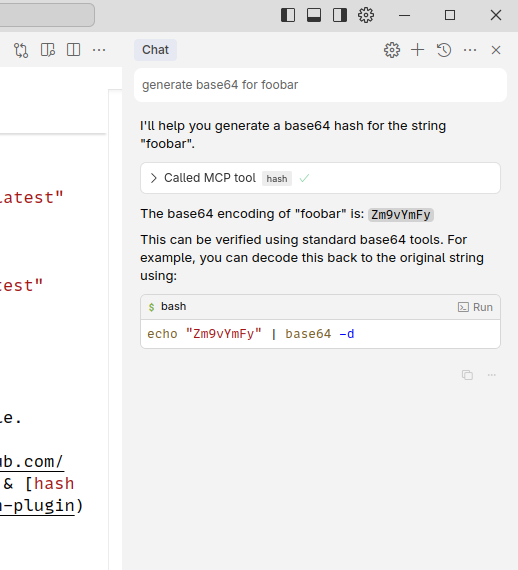
Using with Claude Desktop
Every GitHub Release ships an MCP Bundle (.mcpb) for each platform alongside the raw binaries:
| Platform | Bundle |
|---|---|
| macOS (Apple Silicon) | hyper-mcp-aarch64-apple-darwin.mcpb |
| Linux (x86_64) | hyper-mcp-x86_64-unknown-linux-gnu.mcpb |
| Linux (ARM64) | hyper-mcp-aarch64-unknown-linux-gnu.mcpb |
| Windows (x86_64) | hyper-mcp-x86_64-pc-windows-msvc.mcpb |
Download the bundle for your platform and double-click it (or drag it into Claude Desktop) to get a one-click install dialog. Claude Desktop will prompt you for:
- Plugin config file — path to your
config.json/config.yamllisting the WASM plugins to load (see Getting Started andconfig.example.json). - Enable dynamic plugin loading (optional).
- Skip OCI signature verification (optional, not recommended).
The bundle contains only the
hyper-mcpbinary. Loadingoci://plugins still requires cosign on yourPATHunless you enable "Skip OCI signature verification".
The bundle manifest lives in mcpb/manifest.json and is packed per-platform by the release workflow.
Using with Claude Code
The quickest way is a direct add (requires hyper-mcp already installed via Homebrew/cargo):
claude mcp add hyper-mcp -- hyper-mcp --config-file /path/to/config.json
Or install it from our plugin marketplace:
/plugin marketplace add hyper-mcp-rs/hyper-mcp
/plugin install hyper-mcp@hyper-mcp-rs
/reload-plugins
The marketplace catalog (.claude-plugin/marketplace.json) and plugin (plugins/hyper-mcp) live in this repo. See the plugin README for prerequisites and configuration.
Available Plugins
We maintain several plugins to get you started:
V1 Plugins
These plugins use the v1 plugin interface. While still supported, new plugins should use the v2 interface.
- time: Get current time and do time calculations (Rust)
- qr_code: Generate QR codes (Rust)
- hash: Generate various types of hashes (Rust)
- myip: Get your current IP (Rust)
- crypto_price: Get cryptocurrency prices (Go)
- fs: File system operations (Rust)
- github: GitHub plugin (Go)
- eval_py: Evaluate Python code with RustPython (Rust)
- memory: Let you store & retrieve memory, powered by SQLite (Rust)
- crates-io: Get crate general information, check crate latest version (Rust)
- gomodule: Get Go modules info, version (Rust)
- qdrant: keeping & retrieving memories to Qdrant vector search engine (Rust)
- gitlab: GitLab plugin (Rust)
- meme_generator: Meme generator (Rust)
- think: Think tool(Rust)
- maven: Maven plugin (Rust)
- serper: Serper web search plugin (Rust)
V2 Plugins
These plugins use the v2 plugin interface. New plugins should use this interface.
- arxiv: Search arXiv papers (Rust)
- context7: Lookup library documentation (Rust)
- defuddle: Get the main content of any page as Markdown (Rust)
- fetch: Basic webpage fetching (Rust)
- monty: A minimal, secure Python interpreter written in Rust for use by AI (Rust)
- rstime: Get current time and do time calculations (Rust)
- sqlite: Interact with SQLite (Rust)
Community-built plugins
- hackernews: This plugin connects to the Hacker News API to fetch the current top stories and display them with their titles, scores, authors, and URLs.
- release-monitor-id: This plugin retrieves project ID from release-monitoring.org, which helps track versions of released software.
- yahoo-finance: This plugin connects to the Yahoo Finance API to provide stock prices (OHLCV) based on a company name or ticker symbol.
- rand16: This plugen generates random 16 bytes buffer and provides it in base64uri format - very usable for symmetric cryptography online.
Documentation
- Built-in Tools Reference - Documentation for the
hyper_mcp-*tools including:hyper_mcp-list_plugins— list all loaded pluginshyper_mcp-load_plugin— dynamically load a plugin at runtimehyper_mcp-unload_plugin— dynamically unload a plugin at runtime
- Runtime Configuration Guide - Comprehensive guide to configuration options including:
- Authentication setup (Basic, Token, and Keyring)
- Plugin runtime configuration
- Security considerations and best practices
- Platform-specific keyring setup for macOS, Linux, and Windows
- Troubleshooting authentication issues
- Skip Tools Pattern Guide - Comprehensive guide to filtering tools using regex patterns:
- Pattern syntax and examples
- Common use cases and best practices
- Environment-specific filtering strategies
- Advanced regex techniques
- Migration and troubleshooting
Creating Plugins
For comprehensive instructions on creating plugins, see CREATING_PLUGINS.md.
For ready-to-use plugin templates in Rust and Go, see TEMPLATES.md.
License
Star History
Reviews
No reviews yet. Be the first.
Related
chrome-devtools-mcp
Reliable automation, in-depth debugging, and performance analysis in Chrome using Chrome DevTools and Puppeteer
ECC
Harness-native ECC plugin for engineering teams - 63 agents, 249 skills, 79 legacy command shims, reusable hooks, rules, MCP conventions, and operator workflows for Claude Code plus adjacent agent harnesses
ponytail
Lazy senior dev mode. Forces the simplest, shortest solution that actually works: YAGNI, stdlib first, no unrequested abstractions.
mh install plugins/hyper-mcp