director-mode-lite
Use Claude Code like a Director, not a Programmer. Complete toolkit with 27 commands, 14 agents, 32 skills, and TDD-based Auto-Loop.
pinned to #0110500updated 3 months ago
Ask your AI client: “install plugins/director-mode-lite”.
Requires the metahub MCP server installed in your client. Set up MCP.
mh install plugins/director-mode-litemetahub onboarded this repo on the author's behalf.
If you own github.com/claude-world/director-mode-lite on GitHub, claim the listing to take over publishing. Your claim preserves the existing eval history and badges; only the curator label is replaced with verified-publisher on your next publish.
Stars
74
Last commit
3 months ago
Latest release
published
- #ai-agents
- #ai-coding
- #anthropic
- #automation
- #claude-code
- #claude-code-plugin
- #claude-code-plugins
- #claude-code-skills
- #developer-tools
- #tdd
What's bundled
Items extracted from this plugin's manifest + directory tree.
Skills (32)
skills/agent-checkValidate custom agent file format and structure. Use after creating or editing an agent, before committing agent changes, or when an agent fails to load.skills/agent-templateGenerate custom agent from template. Use when creating a new subagent from scratch, or scaffolding an agent file with correct frontmatter.skills/agentsList all available agents (core, expert, self-evolving). Use when the user asks what agents are available or runs /agents.skills/auto-loopTDD-based autonomous development loop with checkpoint recovery and observability changelogskills/changelogView and manage the runtime changelog for observabilityskills/check-environmentVerify the development environment is ready for Director Mode: claude CLI, git, python3, jq, project runtime, and installed skills/agents/hooks. Use after installation, when hooks or skills misbeha…skills/claude-md-checkValidate CLAUDE.md structure and completenessskills/claude-md-templateGenerate CLAUDE.md template for current project
Subagents (8)
agents-expert|claude-md-expert|code-reviewer|completion-judge|debugger|doc-writer|evolving-orchestrator|experience-extractor|
Hooks (1)
- settings-hooks
Automated checks the publisher passed at publish time — structure, docs, safety, and whether the artifact behaves as claimed.0110500· 3 months ago
Behavioral checks ran but aren't published for this artifact; the static checks above ran at publish time.
Select a category above to see its individual checks.
Release history
1- releasecurrent0110500pass3 months ago
Contents
Director Mode Lite
<strong>Use Claude Code like a Director, not a Programmer</strong>
Website | Quick Start | Features | Examples | Discord
<i>"Don't write code. Direct Claude to write code for you."</i>
Start Here
After installing, run these 3 commands:
/getting-started          # Guided 5-minute onboarding
/project-init             # Auto-detect project and configure
/workflow                 # Start your first feature
New to Director Mode? Read What is Director Mode? below, or jump to Quick Start.
<strong>Compatibility</strong>
Director Mode Lite is fully compatible with the latest Claude Code release (Claude 5 era), including support for:
- Claude 5 family model selection in agent/skill frontmatter (
fable,opus,sonnet,haikualiases) - Agent Teams (experimental multi-agent collaboration)
- 1M context window models (
opus[1m],sonnet[1m]) - All 30 hook event types including
SessionStart,PreCompact, andPostCompact - Multi-account delegation via
CLAUDE_CONFIG_DIRprofiles (/handoff-claude)
Tested with Claude Code CLI v2.1.201 as of July 2026. Works with Claude Fable 5, Opus 4.8, Sonnet 5, and Haiku 4.5.
What is Director Mode?
Director Mode is a paradigm shift in AI-assisted development. Instead of writing code line by line, you direct Claude to execute your vision autonomously.
  Traditional Coding                    Director Mode
  ━━━━━━━━━━━━━━━━━━                    ━━━━━━━━━━━━━━

  You: Write code                       You: Define the vision
  AI:  Follow orders                    AI:  Execute autonomously
       ↓                                     ↓
  Micromanagement                       Strategic oversight
  One task at a time                    Parallel agent execution
  Manual intervention                   Continuous automation
Core Principles
| Principle | Description |
|---|---|
| Efficiency First | Direct execution, minimal interruption |
| Parallel Processing | Multiple agents working simultaneously |
| Autonomous Execution | AI handles implementation details |
| Strategic Oversight | You focus on "what" and "why" |
Key Feature: TDD-Driven Auto-Loop
<table> <tr> <td width="50%">Test-Driven Development Automation
Similar to Ralph Wiggum, Auto-Loop uses Stop hooks but focuses on TDD:
- Acceptance Criteria Tracking - Parse
- [ ]and auto-check completion - TDD Methodology - Red-Green-Refactor cycle guidance
- Checkpoint Recovery - Resume from
.auto-loop/checkpoint.json - Agent Collaboration - code-reviewer, test-runner integration
Stop anytime with:
touch .auto-loop/stop
/auto-loop "Create a calculator

Acceptance Criteria:
- [ ] add(a, b) function
- [ ] subtract(a, b) function
- [ ] Unit tests"

[Iteration 1] RED    → Write test...
[Iteration 2] GREEN  → Implement...
[Iteration 3] REFACTOR → Clean...
[Iteration 4] GREEN  → subtract()...
[Iteration 5] All criteria complete!
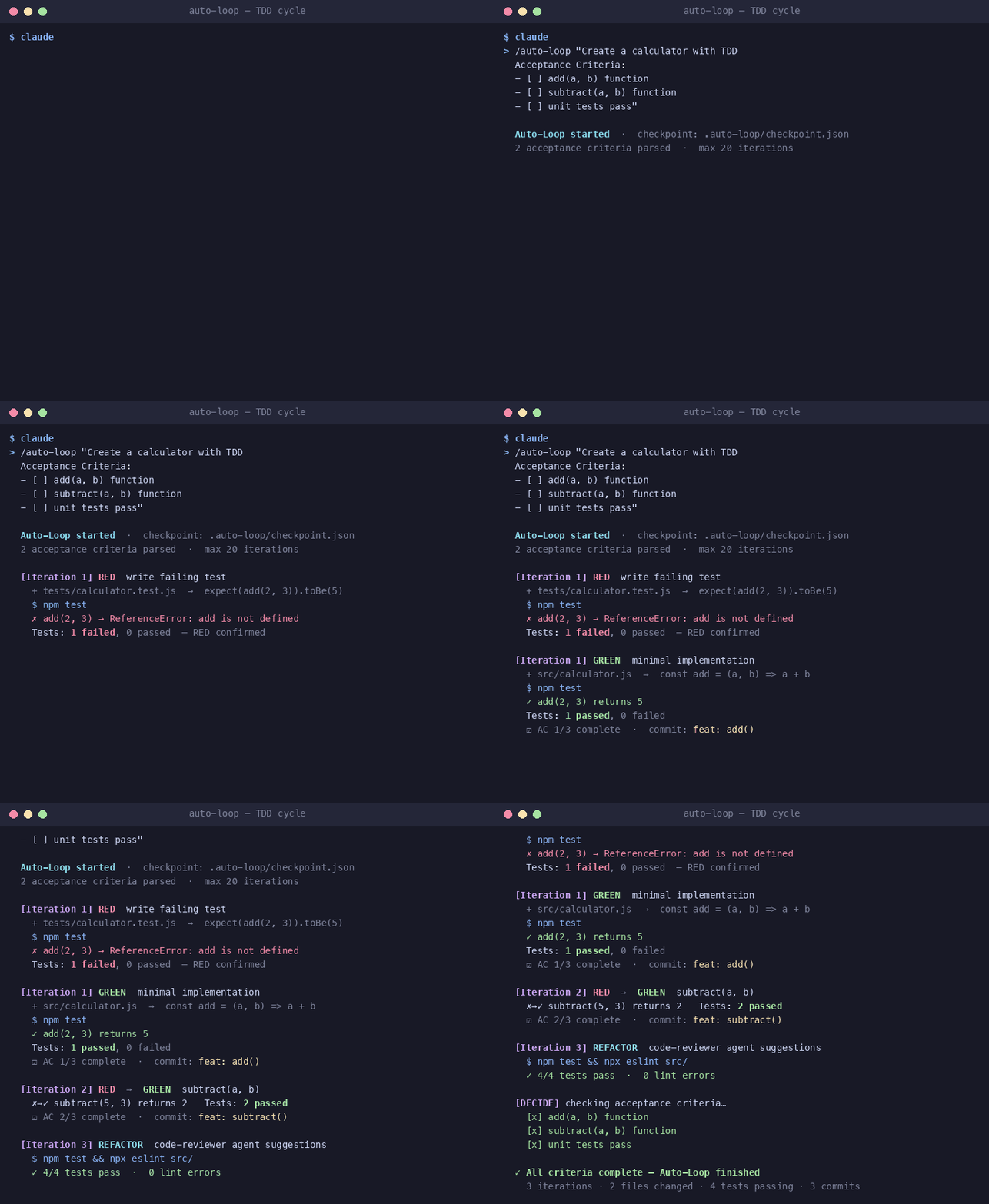
Self-Evolving Loop
<table> <tr> <td width="50%">Beyond Auto-Loop: Strategy Evolution
Self-Evolving Loop takes automation further by:
- Dynamic Skill Generation - Creates custom skills for each task
- Learning from Failures - Extracts patterns and root causes
- Strategy Evolution - Improves its own execution approach
- 8-Phase Workflow - ANALYZE → GENERATE → EXECUTE → VALIDATE → DECIDE → LEARN → EVOLVE → SHIP
Key difference from auto-loop:
| Feature | auto-loop | evolving-loop |
|---|---|---|
| Strategy | Fixed TDD | Dynamic |
| Learning | None | Extracts patterns |
| Adaptation | Low | High |
/evolving-loop "Build REST API

Acceptance Criteria:
- [ ] GET /users endpoint
- [ ] POST /users endpoint
- [ ] Input validation
- [ ] Error handling
"

# The loop:
# 1. Analyzes requirements deeply
# 2. Generates custom executor skill
# 3. Executes with TDD
# 4. Validates results
# 5. If fails: learns & evolves skills
# 6. Repeats until all criteria pass
# 7. Ships the final result
Check status:
/evolving-status
/evolving-status --history
/evolving-status --evolution
See docs/SELF-EVOLVING-LOOP.md for complete documentation.
Quick Start
Option A: Plugin Install (Recommended)
# 1. Install plugin via Claude Code marketplace
claude plugin install director-mode-lite

# 2. Navigate to your project directory
cd your-project

# 3. Run installation script from cached plugin
~/.claude/plugins/cache/director-mode-lite/director-mode-lite/1.8.1/install.sh .

# 4. Verify installation
~/.claude/plugins/cache/director-mode-lite/director-mode-lite/1.8.1/scripts/verify-install.sh .
<strong>🔧 Plugin Management Commands</strong>
# Update plugin to latest version
claude plugin marketplace update director-mode-lite
claude plugin uninstall director-mode-lite
claude plugin install director-mode-lite

# Check installed plugins
cat ~/.claude/plugins/installed_plugins.json | jq '.'

# View plugin cache
ls -la ~/.claude/plugins/cache/director-mode-lite/director-mode-lite/1.8.1/
Option B: Clone and Install
git clone https://github.com/claude-world/director-mode-lite.git
cd director-mode-lite
./install.sh /path/to/your/project
Option C: Try Demo First
git clone https://github.com/claude-world/director-mode-lite.git
cd director-mode-lite
./demo.sh ~/director-mode-demo
Verify Installation
Run the verifier against the project where you installed Director Mode Lite:
# Plugin install
~/.claude/plugins/cache/director-mode-lite/director-mode-lite/1.8.1/scripts/verify-install.sh .

# Clone install
./scripts/verify-install.sh /path/to/your/project
The script checks:
CLAUDE.mdplus core.claude/files and directories- Required
CLAUDE.mdsections from the template .claude/skills/and.claude/agents/are populated
It prints colored PASS and FAIL lines, exits 0 when all checks pass, and exits 1 if any check fails.
<strong>✨ Installation Features</strong>
- Automatic Backup - Backups existing
.claude/to.claude-backup-TIMESTAMP/ - Portable Path Hooks - All hooks use
$CLAUDE_PROJECT_DIRfor portability (no more "file not found" errors) - Smart Merge - Preserves existing settings, only adds new hooks
- Skip Existing - Won't overwrite already-installed commands/agents/skills
- Clean Uninstall -
./uninstall.shremoves all installed files - Automated Tests -
./tests/run-tests.shvalidates installation
What's Included
<table> <tr> <td valign="top" width="33%">Commands (27)
Workflow:
| Command | Purpose |
|---|---|
/workflow | 5-step dev flow |
/focus-problem | Problem analysis |
/test-first | TDD cycle |
/smart-commit | Auto commits |
/plan | Task breakdown |
/auto-loop | TDD loop |
/evolving-loop | Self-evolving |
/evolving-status | Loop status |
Setup & Health:
| Command | Purpose |
|---|---|
/getting-started | 5-min onboarding |
/project-init | Quick setup |
/check-environment | Env check |
/project-health-check | 7-point audit |
Validators:
| Command | Purpose |
|---|---|
/claude-md-check | Validate CLAUDE.md |
/mcp-check | Validate MCP config |
/agent-check | Validate agent files |
/skill-check | Validate skill files |
/hooks-check | Validate hooks |
Generators:
| Command | Purpose |
|---|---|
/claude-md-template | Generate CLAUDE.md |
/agent-template | Generate agents |
/skill-template | Generate skills |
/hook-template | Generate hooks |
Utilities:
| Command | Purpose |
|---|---|
/changelog | Session events |
/handoff-codex | Delegate to Codex |
/handoff-gemini | Delegate to Gemini |
/handoff-claude | Multi-account Claude |
/agents | List agents |
/skills | List skills |
Agents (14)
Core Agents:
| Agent | Purpose |
|---|---|
code-reviewer | Quality, security |
debugger | Error analysis |
doc-writer | Documentation |
Expert Agents:
| Agent | Purpose |
|---|---|
claude-md-expert | CLAUDE.md design |
mcp-expert | MCP configuration |
agents-expert | Custom agents |
skills-expert | Custom skills |
hooks-expert | Automation hooks |
Self-Evolving Agents:
| Agent | Purpose |
|---|---|
evolving-orchestrator | Loop coordination |
requirement-analyzer | Deep analysis |
skill-synthesizer | Generate skills |
completion-judge | Decision making |
experience-extractor | Learn from failures |
skill-evolver | Evolve strategy |
Skills (32)
27 of the skills are the slash commands listed left. The other 5 are internal knowledge bases, auto-loaded by agents or triggered by Claude:
| Internal Skill | Purpose |
|---|---|
code-reviewer | Review checklists |
debugger | 5-step method |
doc-writer | Doc templates |
test-runner | Test commands |
interop-router | Auto CLI routing |
Plus:
- CLAUDE.md template
- Starter hooks (Auto-Loop, changelog, validator)
- 4 hands-on examples
The 5-Step Workflow
┌─────────────────────────────────────────────────────────────────┐
│                                                                 │
│    Step 1                Step 2                Step 3           │
│  ┌─────────┐           ┌─────────┐           ┌─────────┐        │
│  │ FOCUS   │    ──►    │ PREVENT │    ──►    │  TEST   │        │
│  │ PROBLEM │           │ OVERDEV │           │  FIRST  │        │
│  └─────────┘           └─────────┘           └─────────┘        │
│       │                     │                     │             │
│  Understand             Only build            Red-Green-        │
│  before coding          what's needed         Refactor          │
│                                                                 │
│                    Step 4                Step 5                 │
│                  ┌─────────┐           ┌─────────┐              │
│           ──►    │DOCUMENT │    ──►    │ COMMIT  │              │
│                  └─────────┘           └─────────┘              │
│                       │                     │                   │
│                  Auto-generated         Conventional            │
│                  documentation          Commits                 │
│                                                                 │
└─────────────────────────────────────────────────────────────────┘
Parallel Agent Execution
One of Director Mode's key advantages is parallel processing:
<table> <tr> <td width="50%">Traditional (Sequential)
Agent 1 ─────►
              Agent 2 ─────►
                            Agent 3 ─────►
                                          Agent 4 ─────►

Total time: 4 × single_agent_time
Director Mode (Parallel)
Agent 1 ─────┐
Agent 2 ─────┼────► Results
Agent 3 ─────┤
Agent 4 ─────┘

Total time: max(single_agent_time)
Example: Problem Analysis
# Old way: Sequential manual searches
grep -r "authentication" src/
grep -r "login" src/
cat src/auth/index.ts
# ... slow, tedious

# Director Mode: One command, 5 parallel agents
/focus-problem "understand the authentication flow"
Scale Out: Multi-Account Delegation
Parallelism doesn't stop at one account. /handoff-claude delegates tasks to other authorized Claude Code instances — each with its own login, quota, and session state via CLAUDE_CONFIG_DIR profiles:
# One-time setup per profile (isolated login, sessions, settings)
CLAUDE_CONFIG_DIR=~/.claude-profiles/z-1 claude auth login

# Fan out to two accounts in parallel, conflict-free via git worktrees
(cd ../proj-task-a && claude-z-1 -p "Implement feature A" --permission-mode acceptEdits) &
(cd ../proj-task-b && claude-z-2 -p "Implement feature B" --permission-mode acceptEdits) &
wait
Run /handoff-claude for the full setup guide (wrapper commands, auth, result collection).
Agents
<table> <tr> <td width="33%">code-reviewer
Automatically reviews:
- Code quality
- Security vulnerabilities
- Error handling
- Performance
- Test coverage
Triggers: Code changes, commits, "review"
</td> <td width="33%">debugger
5-step debugging:
- Capture error info
- Isolate problem
- Form hypotheses
- Investigate
- Fix & verify
Triggers: Errors, test failures, "bug"
</td> <td width="34%">doc-writer
Creates and maintains:
- README files
- API documentation
- Code comments
- Architecture docs
Triggers: New features, structure changes
</td> </tr> </table>Expert Agents
Director Mode Lite includes 5 Expert Agents that deeply understand Claude Code's official features:
<table> <tr> <td width="20%">claude-md-expert
Your guide for:
- CLAUDE.md design patterns
- Project configuration
- Best practices
Ask: "How should I structure my CLAUDE.md?"
</td> <td width="20%">mcp-expert
Your guide for:
- MCP server setup
- Available MCPs
- Troubleshooting
Ask: "How do I add a Notion MCP?"
</td> <td width="20%">agents-expert
Your guide for:
- Custom agent creation
- Tool permissions
- Agent patterns
Ask: "Create a security-reviewer agent"
</td> <td width="20%">skills-expert
Your guide for:
- Slash command creation
- Skill frontmatter
- Workflow design
Ask: "Make a /deploy command"
</td> <td width="20%">hooks-expert
Your guide for:
- Stop hooks (Auto-Loop)
- PreToolUse/PostToolUse
- Automation patterns
Ask: "How do I protect .env files?"
</td> </tr> </table>Why? Anthropic provides documentation, but no specialized helpers. These experts know the official docs and help you implement correctly.
Validators & Generators
Pair with Expert Agents for validate-then-fix or template-then-customize workflows:
<table> <tr> <td width="50%">Validators (5)
Validate your configurations and get actionable fix suggestions:
/claude-md-check              # Check CLAUDE.md structure
/mcp-check                    # Check MCP settings.json
/agent-check [file.md]        # Check agent file format
/skill-check [file.md]        # Check skill file format
/hooks-check                  # Check hooks config + scripts
Output format:
## Validation Report

### Status: ✅ PASS / ⚠️ WARNINGS / ❌ FAIL

| Check | Status | Notes |
|-------|--------|-------|
| ...   | ✅/❌  | ...   |

### Issues Found
1. [Issue and recommendation]

### Auto-Fix Available
- Run command X to fix...
Generators (4)
Generate properly-formatted files from templates:
/claude-md-template           # Generate CLAUDE.md
/agent-template [name] [purpose]  # Generate agent
/skill-template [name] [purpose]  # Generate skill
/hook-template [type] [purpose]   # Generate hook
Example:
/agent-template security-scanner "scan for vulnerabilities"

# Creates: .claude/agents/security-scanner.md
# with proper frontmatter, activation triggers,
# output format, and guidelines
Hook types:
PreToolUse- Block/validate before tool runsPostToolUse- Log/react after tool runsStop- Continue automation loopsNotification- External alerts (Slack, etc.)
CLAUDE.md Configuration
The CLAUDE.md file configures Claude's behavior in your project:
# Project: My App
Tech: TypeScript, React, PostgreSQL

# Policies
- Always write tests first
- Use conventional commits
- Document public APIs

# Workflow
- Parallel agents: enabled
- Auto-commit: disabled
- Review before merge: required
See docs/CLAUDE-TEMPLATE.md for a complete template.
Comparison
<table> <tr> <th></th> <th>Traditional AI Coding</th> <th>Director Mode Lite</th> </tr> <tr> <td><strong>Workflow</strong></td> <td>Ask → Wait → Copy → Test → Repeat</td> <td>Direct → Auto-execute → Review</td> </tr> <tr> <td><strong>Parallelism</strong></td> <td>One task at a time</td> <td>Multiple agents simultaneously</td> </tr> <tr> <td><strong>Automation</strong></td> <td>Manual intervention needed</td> <td>Auto-Loop runs until done</td> </tr> <tr> <td><strong>Testing</strong></td> <td>Often forgotten</td> <td>TDD built into workflow</td> </tr> <tr> <td><strong>Documentation</strong></td> <td>Afterthought</td> <td>Auto-generated</td> </tr> </table>Examples
Learn by doing with hands-on tutorials:
| Example | Description | Time |
|---|---|---|
| Calculator | Auto-Loop TDD demo | 5 min |
| REST API | Building an API with TDD | 15 min |
| CLI Tool | Command-line tool | 10 min |
| TypeScript Library | Publishable npm library | 20 min |
See examples/ for full tutorials.
Community
<table> <tr> <td align="center" width="25%"> [ <strong>🌐 Website</strong>claude-world.com ](https://claude-world.com)
</td> <td align="center" width="25%"> [ <strong>💬 Discord</strong>Join the community ](https://discord.com/invite/rBtHzSD288)
</td> <td align="center" width="25%"> [ <strong>📊 Live Stats</strong>Traffic & community growth ](https://claude-world.com/stats)
</td> <td align="center" width="25%"> [ <strong>🐛 Issues</strong>Report bugs, request features ](https://github.com/claude-world/director-mode-lite/issues)
</td> </tr> </table>Documentation
| Document | Description |
|---|---|
| FAQ | Common questions answered |
| Concepts | Deep dive into methodology |
| CLAUDE.md Template | Project configuration guide |
| Hooks Guide | Hook implementation reference (30 event types) |
| Self-Evolving Loop | Dynamic skill evolution system |
| Development Patterns | Learned best practices |
Related Projects
Other open-source tools from the Claude World community:
| Project | Description | Link |
|---|---|---|
| cf-browser | Cloudflare Browser MCP server for headless browsing, screenshots, and web scraping within Claude Code | github.com/anthropic-community/cf-browser |
| trend-pulse | Real-time trend aggregation MCP server -- monitors 8+ sources (GitHub, Hacker News, Reddit, etc.) for content ideas | github.com/anthropic-community/trend-pulse |
These tools work great alongside Director Mode Lite. Use
cf-browserfor web research agents andtrend-pulsefor staying on top of developer trends.
Author
Lucas Wang (@lukashanren1)
- GitHub: @gn00295120
- Website: claude-world.com
License
MIT License - Free for personal and commercial use.
See LICENSE for details.
About Director Mode Lite
This is a free, open-source toolkit (v1.8.0) from the Claude World community, compatible with the latest Claude Code (Claude 5 era).
<table> <tr> <td width="50%">What's included (FREE):
- 27 Commands (incl. validators & generators)
- 14 Agents (3 Core + 5 Experts + 6 Self-Evolving)
- 32 Skills
- Auto-Loop with TDD
- Expert-guided project setup
- Validation & template generation
- Complete documentation
Want more?
Visit claude-world.com for:
- Advanced methodologies
- Enterprise support
- Full Director Mode experience
<sub>Made with direction by Claude World Taiwan</sub>
Reviews
No reviews yet. Be the first.
Related
ECC
Harness-native ECC plugin for engineering teams - 63 agents, 249 skills, 79 legacy command shims, reusable hooks, rules, MCP conventions, and operator workflows for Claude Code plus adjacent agent harnesses
ponytail
Lazy senior dev mode. Forces the simplest, shortest solution that actually works: YAGNI, stdlib first, no unrequested abstractions.
agentic-bundle-aas-accessibility-inclusive-ux
Editorial "AAS Accessibility & Inclusive UX" bundle for Claude Code from Agentic Awesome Skills.
mh install plugins/director-mode-lite