bloom
A personal AI tutor based on Bloom's 2-sigma research: it generates a structured syllabus, teaches one adaptive lesson at a time, and tailors each next lesson to the learner's highlights and feedback. Bundles the bloom-tutor tutoring skill plus six learn-* learning-method skills.
pinned to #31718b9updated 2 months ago
Ask your AI client: “install plugins/bloom”.
Requires the metahub MCP server installed in your client. Set up MCP.
mh install plugins/bloommetahub onboarded this repo on the author's behalf.
If you own github.com/Li-Evan/Bloom on GitHub, claim the listing to take over publishing. Your claim preserves the existing eval history and badges; only the curator label is replaced with verified-publisher on your next publish.
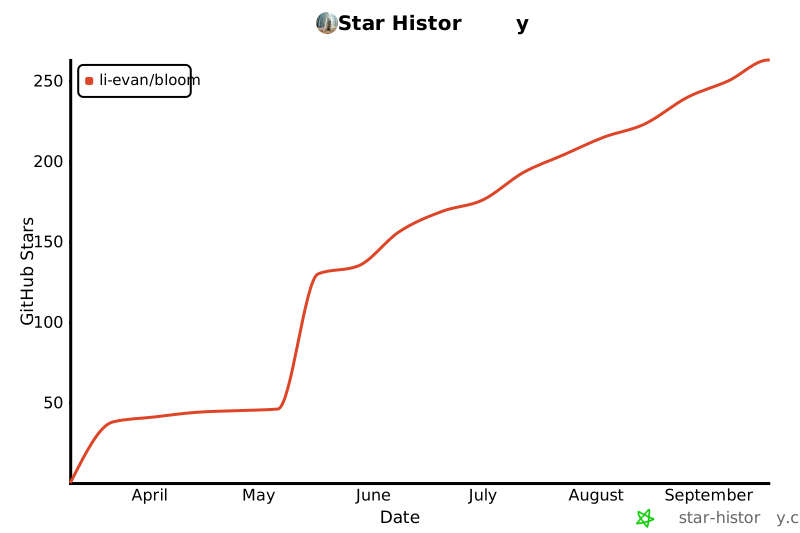
Stars
196
Last commit
2 months ago
Latest release
published
- #adaptive-learning
- #agent-skills
- #ai-agent
- #ai-tutor
- #bloom-2-sigma
- #chinese
- #claude-code
- #claude-skill
- #edtech
- #education
- #fastapi
- #learning
- #llm
- #personalized-learning
- #react
- #self-hosted
- #socratic-method
- #study-tool
What's bundled
Items extracted from this plugin's manifest + directory tree.
Skills (7)
skills/bloom-tutorUse when 用户想以一对一苏格拉底导师的方式系统学习一个课题——开一门新课、推进课题的下一篇、提交学习反馈或说「我读完了」、或整理/查看学习日志。基于 Bloom 2 Sigma 的交互式学习系统。触发词:开个文件夹学X、我想学X、帮我学X、继续、下一篇、我读完了、整理学习、查看学习日志、interactive Socratic tutoring、Bloom 2 sigma learn…skills/learn-crossover当用户学习或接触一个新概念/新技术/新算法/新领域时使用(尤其感到陌生或有点难时)。用「跨界原则」拿用户已掌握的知识快速撬动新知识——指出他其实已经学过的同一个东西(换了名字)、结构同构的旧知识、能解释新知识的已有知识,并点出新概念体现的跨领域元知识模式。让「学新东西」变成「发现你已经会了一半」。触发场景:学 X、接触 X、这个好难、X 是什么、帮我理解 X。skills/learn-deep用户学任何新概念/新技术/新理论的默认深度入口——一次性用五个视角把概念讲透并帮他选深入方向:crossover 用已会的撬动、occam 框定该学多深、graph 建知识地图、prototype 最小原型迭代、feynman 拷问检验。触发场景:我想学 X、理解 X、X 是什么、讲讲 X、搞懂 X、学一下 X、深入 X、给我讲讲 X。除非用户明确只要某一个视角(那时改用对应的单个 lear…skills/learn-feynman当用户学完一个东西想自查是否真懂、或觉得「好像懂了」但不确定时使用。用「费曼学习法」让他用自己的话把概念讲出来,你扮好奇学生专挑他含糊/跳过的地方追问,把「讲不顺的模糊处」揪出来作为没真懂的漏洞,定位是缺前置知识还是没想透,判断理解是否闭环。触发场景:我学完了考考我、自查一下、我好像懂了、我讲讲你看对不对、检验我的理解、这个我真懂了吗。skills/learn-graph当用户要系统学一个新领域、不知道从哪入手、或担心「学得不够系统」时使用。用「知识图谱学习法」和用户一起构建该领域的概念/用途/父子节点图谱(自己建图的过程本身就是学习),标出复用价值最高的节点和「从常识就能入门的点」,给出有效学习路径并回答「学到哪算够」。触发场景:系统学 X 领域、从哪开始学、学得不系统、想要 X 的全貌、规划学习路径、这个领域有多大。skills/learn-occam当用户纠结要不要学某个东西、学到什么程度,或在做时间/精力/项目取舍时使用。用「简易策略」先逼问要解决的既定问题,检验现有知识能否搞定,评估知识贬值速度与 ROI,用「探索 vs 应用」判断该学新的还是用现有的,给出「学 / 不学 / 只学最小够用」的结论,避免囤积会贬值的知识。触发场景:要不要学 X、值不值得深入、学到什么程度够、时间不够该学啥、该深挖还是够用就行。skills/learn-prototype当用户要做/研究一个东西、想提升某个技能、或觉得某个产出不够好想改进时使用。用「改良主义」先逼出一个最垃圾但能跑的原型,再引导他自己洞察缺陷、提出问题,提改良假说→实践检验→迭代,信奉「洞察缺陷 > 如何优化 > 最终答案」,并把每次改进的方法本身沉淀成方法论。触发场景:要做 X、研究 X、提升 X、X 做得不好想改进、怎么优化 X、不知从哪下手做。
Automated checks the publisher passed at publish time — structure, docs, safety, and whether the artifact behaves as claimed.31718b9· 2 months ago
Behavioral checks ran but aren't published for this artifact; the static checks above ran at publish time.
Select a category above to see its individual checks.
Release history
1- releasecurrent31718b9pass2 months ago
Contents
In 1984, educational psychologist Benjamin Bloom discovered that students receiving one-on-one tutoring scored 2 standard deviations (+2σ) above the classroom average — jumping to the top 2%. Bloom called this the "2 Sigma Problem": the effect is proven, but personal tutors don't scale.
Bloom solves this with AI. It generates a structured syllabus, delivers lessons one at a time, reads your annotations and feedback, then tailors the next lesson to your exact understanding level — just like a real tutor would.
Two Ways to Use
| Mode | Setup | Best for |
|---|---|---|
| CLI | Claude Code + terminal | Power users who like Markdown editors |
| Web | Browser (React + FastAPI) | Visual learners, shareable setup |
Both follow the same flow: syllabus → lesson → annotate → feedback → next lesson → evaluation → summary.
Quick Start: CLI Mode
Requires only Claude Code. No backend.
git clone https://github.com/Li-Evan/Bloom.git
cd Bloom

# Install the tutor skill locally for this clone
mkdir -p .claude/skills
cp -R skills/bloom-tutor .claude/skills/

claude
Then say: Create a new folder and help me learn [any topic]
Or install it as a plugin (bundles bloom-tutor plus the learn-* skills) — in Claude Code:
/plugin marketplace add Li-Evan/Bloom
/plugin install bloom@li-evan
See GUIDE.md for the full walkthrough.
Quick Start: Web Mode
Prerequisites
Setup
git clone https://github.com/Li-Evan/Bloom.git
cd Bloom

# Configure
cp .env.example .env
# Edit .env — fill in LLM_API_KEY

# Backend
cd backend && uv sync && uv run uvicorn app.main:app --reload --port 8000

# Frontend (new terminal)
cd frontend && npm install && npm run dev
Open http://localhost:5173. Click New Course, choose Topic, Source Upload, or Project Files, and start learning.
Docker
cp .env.example .env   # fill in API key
docker compose up -d   # visit http://localhost:3000
How It Works
Topic Mode
Create course → AI generates syllabus + lesson 01
                        ↓
        Read lesson → highlight text → add annotations
                        ↓
        Write feedback → answer thought questions
                        ↓
        Click "Done Reading" → AI generates next lesson
        (answer review + annotation responses + new content)
                        ↓
        Repeat until all mastery items checked ✅
                        ↓
        Auto-generate evaluation → then summary
Source Mode
Upload PDF / TXT / MD → AI generates syllabus + source-reading chapter
                          ↓
       Read source → highlight text → ask and get an immediate answer
                          ↓
       Click "Done Reading" → AI reads the full source + Q&A, then generates the next lesson
                          ↓
       Continue with the normal adaptive lesson flow
Project Files
Upload a file / multiple files / a whole folder → each file renders directly as one page
                          ↓
       Read each file → highlight text → ask and get an immediate answer
                          ↓
       No syllabus, no next-lesson generation; the files and highlight Q&A feed next-step recommendations
Features
- Three course modes — generate from a topic, upload a PDF/TXT/MD source, or Project Files (upload files/a folder, render each directly, highlight-ask anytime, no syllabus or next-lesson generation)
- Learning depth — choose simple, standard, or deep syllabus expansion when creating a course; shown as a badge on each course card
- Reference material — paste textbook chapters, papers, or notes when creating a topic course
- Next-topic recommendations — generate 3 course-ready topics from your full learning history, refresh the set, save ideas to a learning queue, or start one directly through the normal syllabus → lesson flow
- Highlight Q&A sessions — select any text in any lesson (or source) and a small icon pops up; click it to ask. The highlighted text stays marked in yellow, the AI answers instantly, and you can keep asking follow-ups in the same thread. The window is draggable and collapses into a margin dot you can reopen anytime. Each session sees the full lesson + the highlighted span + its own conversation, and your questions still feed the next lesson.
- Adaptive lessons — each lesson addresses your specific gaps from the previous one
- Chapter sidebar — quick-jump between lessons while reading
- Collapsible syllabus — track mastery progress without clutter
- Streaming generation — watch AI write the next lesson in real-time
- Personal center & learning calendar — open the profile from the header to see a month calendar shaded by daily activity; click any day to see which courses, lessons, and highlights you studied, alongside overview stat cards and a six-month contribution heatmap (streaks and grouping use your local date)
Skills
Bloom ships a set of portable Claude Code skills in skills/ — self-contained capability packs you can copy into ~/.claude/skills/ (global) or any project's .claude/skills/ and use anywhere.
| Skill | What it does |
|---|---|
| bloom-tutor | The full interactive tutoring system as one skill — syllabus → adaptive lessons → ??? annotations → evaluation → summary. CLI mode, packaged and portable. |
| learn-deep | Default deep-dive entry — runs all five lenses below in one pass, then helps you pick a direction |
| learn-crossover | Learn a new concept by leveraging what you already know (structural analogies) |
| learn-occam | Decide whether / how deeply something is worth learning (ROI, just-enough) |
| learn-graph | Build a knowledge-graph map of a field plus a learning path |
| learn-prototype | Learn by building the crappiest working prototype, then iterating |
| learn-feynman | Verify true understanding by explaining it back |
Each folder is dependency-free: copy it into a skills directory, then just talk to Claude Code (e.g. "help me learn X", "I'm done reading").
Tech Stack
| Layer | Technology |
|---|---|
| Backend | Python, FastAPI, SQLAlchemy, SQLite |
| Frontend | React, Vite, Tailwind CSS |
| AI | Any OpenAI-compatible LLM API |
| Container | Docker, docker-compose |
| Font | Outfit, JetBrains Mono |
Commands
make dev-backend      # backend with hot reload
make dev-frontend     # frontend dev server
make test             # run pytest
make up / make down   # docker start / stop
Project Structure
├── GUIDE.md               # CLI usage guide
├── .env.example           # env template
├── backend/
│   └── app/
│       ├── courses.py     # course, lesson, annotation, feedback, stats, summary APIs
│       ├── recommendations.py # next-topic recommendation APIs
│       ├── models.py      # Course, Lesson, Annotation, Feedback, Recommendation
│       └── config.py      # reads .env
├── frontend/
│   └── src/pages/
│       ├── DashboardPage  # course list + create form
│       ├── CoursePage     # syllabus + lesson list
│       └── LessonPage     # reader + annotations + feedback + AI gen
├── example/               # pre-built topics for CLI mode
├── site/                  # marketing website (standalone Astro static build, decoupled from the app)
└── skills/                # portable Claude Code skills (bloom-tutor + learn-*)
The Science
| Concept | What it means |
|---|---|
| Bloom's 2 Sigma | 1-on-1 tutoring = +2σ performance over classroom |
| Mastery Learning | Don't move on until the concept is truly understood |
| Socratic Method | Ask questions, don't hand answers |
| Spaced Retrieval | Thought question reviews at lesson start reinforce memory |
| Adaptive Path | Content adjusts to individual feedback in real-time |
Star History
[
](https://star-history.com/#Li-Evan/Bloom&Date)
License
Reviews
No reviews yet. Be the first.
Related
ponytail
Lazy senior dev mode. Forces the simplest, shortest solution that actually works: YAGNI, stdlib first, no unrequested abstractions.
ECC
Harness-native ECC plugin for engineering teams - 63 agents, 249 skills, 79 legacy command shims, reusable hooks, rules, MCP conventions, and operator workflows for Claude Code plus adjacent agent harnesses
ui-ux-pro-max
UI/UX design intelligence. Searchable local database with 84 styles, 161 palettes, 73 font pairings, 25 charts, and 17 stacks (React, Next.js, Vue, Nuxt.js, Nuxt UI, Svelte, Astro, SwiftUI, React Native, Flutter, Tailwind, shadcn/ui, Jetpack Compose, Angular, Laravel, JavaFX, Three.js). Use when designing, building, or reviewing UI: pages, components, color schemes, typography, layout, accessibility, animation, or data visualization.
mh install plugins/bloom