dbhub
Minimal, token-efficient Database MCP Server for PostgreSQL, MySQL, SQL Server, SQLite, MariaDB
pinned to #e99c3aaupdated 3 months ago
Ask your AI client: “install mcps/dbhub”.
Requires the metahub MCP server installed in your client. Set up MCP.
mh install mcps/dbhubmetahub onboarded this repo on the author's behalf.
If you own github.com/bytebase/dbhub on GitHub, claim the listing to take over publishing. Your claim preserves the existing eval history and badges; only the curator label is replaced with verified-publisher on your next publish.
Stars
3,003
Last commit
3 months ago
Latest release
published
- #agents
- #ai
- #anthropic
- #claude
- #claude-ai
- #codex
- #cursor
- #database
- #dify
- #llm
- #mariadb
- #mcp
- #mcp-server
- #mssql
- #mysql
- #postgres
- #postgresql
- #sql
- #sqlite
- #sqlserver
What this server exposes
Surfaces parsed from this server's source at publish time.
Launches: dbhub
Automated checks the publisher passed at publish time — structure, docs, safety, and whether the artifact behaves as claimed.e99c3aa· 3 months ago
Behavioral checks haven't run yet: the sandbox couldn't execute this artifact (it may need credentials we don't provide, or an unsupported build). An environment limit, not a verdict.
Safety
2 passed1 warningDependencies: known vulnerabilitieswarn
2 high/critical advisories — @modelcontextprotocol/[email protected] (HIGH: GHSA-345p-7cg4-v4c7) · @modelcontextprotocol/[email protected] (HIGH: GHSA-8r9q-7v3j-jr4g)
Update the affected packages, then re-publish. (`npm audit` shows the same data locally.)
LICENSE file at repo root
LICENSE
No sensitive files in the repo
scanned for .env, credentials.json, *.pem, .ssh/, AWS / GCP configs — none found
Release history
1- releasecurrente99c3aawarn3 months ago
Contents
[!NOTE]
Brought to you by Bytebase, open-source database DevSecOps platform.
[

            +------------------+    +--------------+    +------------------+
            |                  |    |              |    |                  |
            |                  |    |              |    |                  |
            |  Claude Desktop  +--->+              +--->+    PostgreSQL    |
            |                  |    |              |    |                  |
            |  Claude Code     +--->+              +--->+    SQL Server    |
            |                  |    |              |    |                  |
            |  Cursor          +--->+    DBHub     +--->+    SQLite        |
            |                  |    |              |    |                  |
            |  VS Code         +--->+              +--->+    MySQL         |
            |                  |    |              |    |                  |
            |  Copilot CLI     +--->+              +--->+    MariaDB       |
            |                  |    |              |    |                  |
            |                  |    |              |    |                  |
            +------------------+    +--------------+    +------------------+
                 MCP Clients           MCP Server             Databases
DBHub is a zero-dependency, token efficient MCP server implementing the Model Context Protocol (MCP) server interface. This lightweight gateway allows MCP-compatible clients to connect to and explore different databases:
- Local Development First: Zero dependency, token efficient with just two MCP tools to maximize context window
- Multi-Database: PostgreSQL, MySQL, MariaDB, SQL Server, and SQLite through a single interface
- Multi-Connection: Connect to multiple databases simultaneously with TOML configuration
- Guardrails: Read-only mode, row limiting, and query timeout to prevent runaway operations
- Secure Access: SSH tunneling and SSL/TLS encryption
Supported Databases
PostgreSQL, MySQL, SQL Server, MariaDB, and SQLite.
MCP Tools
DBHub implements MCP tools for database operations:
- execute_sql: Execute SQL queries with transaction support and safety controls
- search_objects: Search and explore database schemas, tables, columns, indexes, and procedures with progressive disclosure
- Custom Tools: Define reusable, parameterized SQL operations in your
dbhub.tomlconfiguration file
Workbench
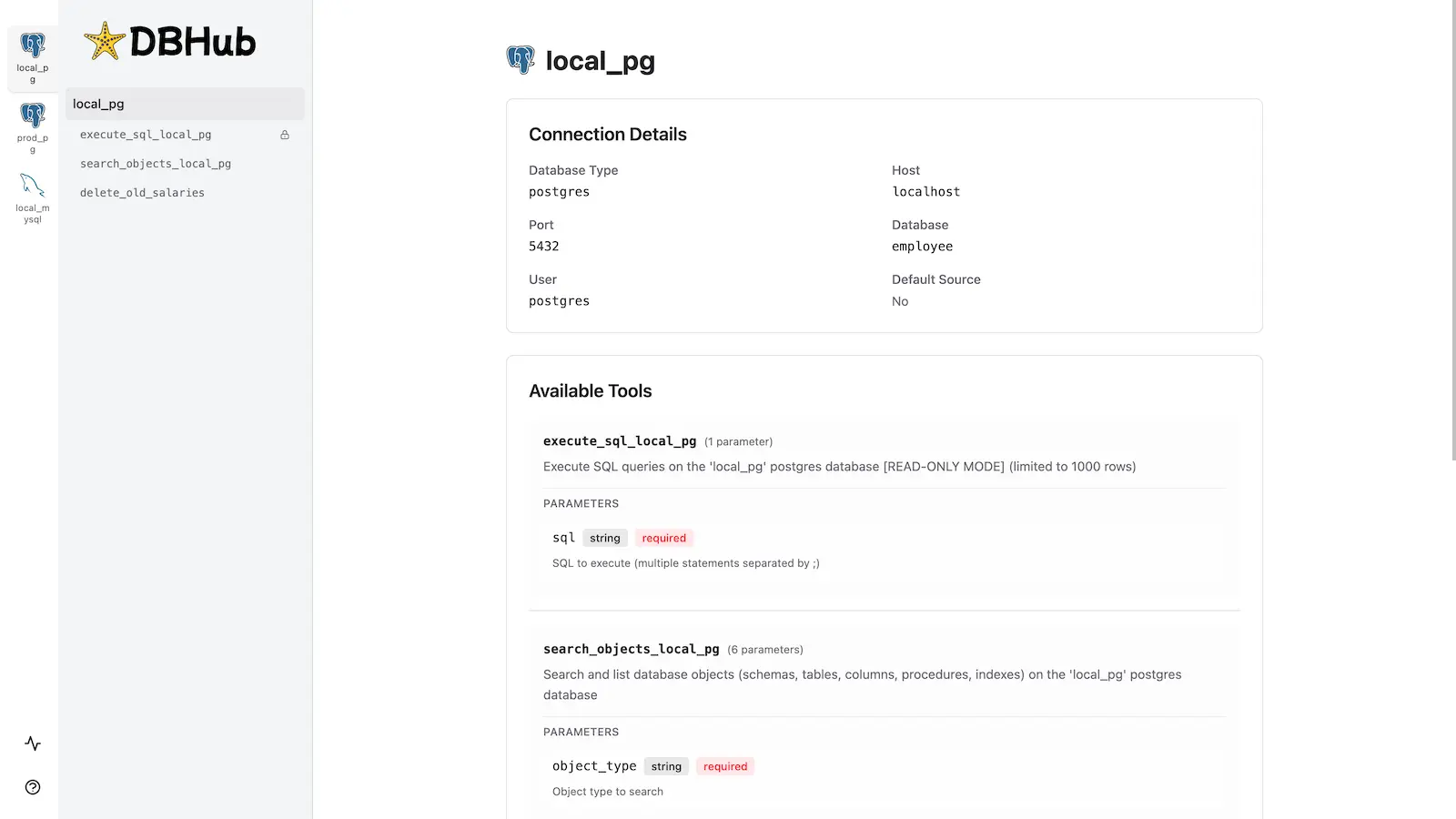
DBHub includes a built-in web interface for interacting with your database tools. It provides a visual way to execute queries, run custom tools, and view request traces without requiring an MCP client.
Installation
See the full Installation Guide for detailed instructions.
Quick Start
Docker:
docker run --rm --init \
   --name dbhub \
   --publish 8080:8080 \
   bytebase/dbhub \
   --transport http \
   --port 8080 \
   --dsn "postgres://user:password@localhost:5432/dbname?sslmode=disable"
NPM: (requires Node.js >= 22.5.0)
npx @bytebase/dbhub@latest --transport http --port 8080 --dsn "postgres://user:password@localhost:5432/dbname?sslmode=disable"
Demo Mode:
npx @bytebase/dbhub@latest --transport http --port 8080 --demo
Restrict to loopback (recommended for production):
npx @bytebase/dbhub@latest --transport http --host 127.0.0.1 --port 8080 --demo
The HTTP transport defaults to
--host 0.0.0.0, exposing DBHub on every network interface. For production, bind to127.0.0.1and front DBHub with a reverse proxy (nginx/Caddy) or firewall — DBHub does not authenticate HTTP clients.
See Command-Line Options for all available parameters.
Multi-Database Setup
Connect to multiple databases simultaneously using TOML configuration files. Perfect for managing production, staging, and development databases from a single DBHub instance.
See Multi-Database Configuration for complete setup instructions.
Development
Requires Node.js >= 22.5.0 (DBHub uses the built-in node:sqlite module).
# Install dependencies
pnpm install

# Run in development mode
pnpm dev

# Build and run for production
pnpm build && pnpm start --transport stdio --dsn "postgres://user:password@localhost:5432/dbname"
Contributors
Star History
[
](https://www.star-history.com/?repos=bytebase%2Fdbhub&type=date&legend=top-left)
Reviews
No reviews yet. Be the first.
Related
Prisma
Prisma is an open-source database toolkit. It includes a JavaScript/TypeScript ORM for Node.js, migrations and a modern GUI to view and edit the data in your database. You can use Prisma in new projects or add it to an existing one.
Caveman
MCP proxy that compresses prose fields (tool descriptions, etc.) using caveman rules. Same accuracy, fewer context tokens.
Nanobot
A lightweight personal AI assistant framework
mh install mcps/dbhub